

Central approvals
Without central approvals, a change that lowers protection waits for whoever’s settings it changes, and the Live Reviewer asks that person about each new text. On a Latet server with Latet Enterprise, your company’s security team can decide instead. Whoever waits sees who decides, and can withdraw what they asked for, but not approve it.
What goes to the security team
Section titled “What goes to the security team”- Changes that lower protection in a person’s settings, the ones Agents and your settings describes: a value never to mask, a lower profile, the local reviewer turned off, a destination moved. On a server they come from the person’s own saves in the dashboard, an import of rules included, and from what the server finds lowered when it applies their settings again or makes their space. What adds protection still applies at once.
- The Live Reviewer’s texts, if your company chooses so. The server masks, so the texts are on it already.
When an administrator lowers the server’s shared settings (latet server config set), each person still decides on
what that changes in their own space, as without central approvals: the change is in the administration log, and the
person’s approval guards their space. If the person’s own settings lower protection too, the change goes to the
security team instead, and so it does, for a while, for a person whose last approval was kept by a Latet before central
approvals: until their settings are next read with nothing waiting, or they next approve a change.
One change waits in a space at a time, and a newer one replaces it. When a change the shared settings bring replaces a request of the person’s that waits for the security team, they ask again. When their request replaces such a change, the settings they approved stay in use, and the server offers that change again the next time it applies their settings (a save of theirs that adds protection makes it do so): it then replaces their request, and they ask again.
A change carries no values. What reaches the security team is what it lowers, as Latet words it (values never to mask: 1 added), the settings it touches, where it came from and who asked. The value itself, the local reviewer’s guidance and a destination’s address stay with the person, in their own dashboard: ask them when you need them.
A request exception asked for is such a
change: it reaches the security team by its destination and how it lowers protection, never a request’s value. Once
someone of the security team, or another of an API key’s controllers, approves it, the exception names them in the
person’s dashboard, and the administration log’s entry for a permanent one (exception.permanent) has them as its
actor. With exceptions: company in the company’s locked rules, a request exception that
someone asks for goes to the security team, whoever decides on the rest of their changes; the administration’s save of
an API key’s settings still approves the exceptions it adds.
A text of the Live Reviewer is different: the security team sees it as the person does, values included, when they open it. This is a choice your company makes, and Latet tells each person, in their dashboard and in Claude Code. Where the law asks for an agreement before a tool that can monitor employees is used (in Italy and in Germany, for example), the company makes that agreement first.
API keys
Section titled “API keys”A program with an API key never approves anything. A change that lowers protection in a key’s settings goes to the
other people who control the key, or to the admins when nobody else does:
whoever makes the change in the key’s space can undo it, not approve it. A key with one controller sends that person’s
changes to the admins. What an administrator sets for a key with an administration token
(latet server config --key …) applies at once, as the server’s own settings do, and is in the administration log.
When the security team decides on changes, it decides on the keys’ too. A key’s Live Reviewer texts go where the
people’s go.
Turn it on
Section titled “Turn it on”With an administration token, from any computer:
latet server approvals set --changes security --live-review securitylatet server approvals showBoth are self until set: each person decides on their own changes and texts, and a key’s changes go to its other
controllers, as above. The license must list approvals. Each change of who decides is kept in the server’s
administration log (approvals.changed, with what changed and the token that changed it). It applies to what opens
from then on: what waits keeps its route, also when it is asked again. Set it once every instance runs this release
with Latet Enterprise: an instance of an earlier release routes nothing, and lets a person approve their own change on
it. The command says how many instances alive do not.
Then give the security role to the people who decide (Sign-in, groups and roles), two at least: nobody approves their own request, so one person alone would wait for ever for their own changes.
Texts go to the security team only where its people open them with the company account: --live-review security
needs single sign-on set up, with company changes asked from it
(latet server sign-in set --company-changes sso, the default). Otherwise the command is refused (409). Texts keep
going to the security team if the sign-in settings change later, and latet server status then warns, case by case. If
single sign-on is removed, each text waits unsent and nobody can decide on it. If the sign-in settings stop asking for
the company account for changes that apply to everyone, each text waits for a security person signed in with that
account, since a session opened with latet dashboard never opens a text.
Tell people first. Each person learns of it in their dashboard and at their first text, after it started; the
command reminds you. The texts wait only while the Live Reviewer is on, and a person can turn theirs off. With
--changes security, turning it off lowers protection, so it waits for the security team too.
What the person who asked sees
Section titled “What the person who asked sees”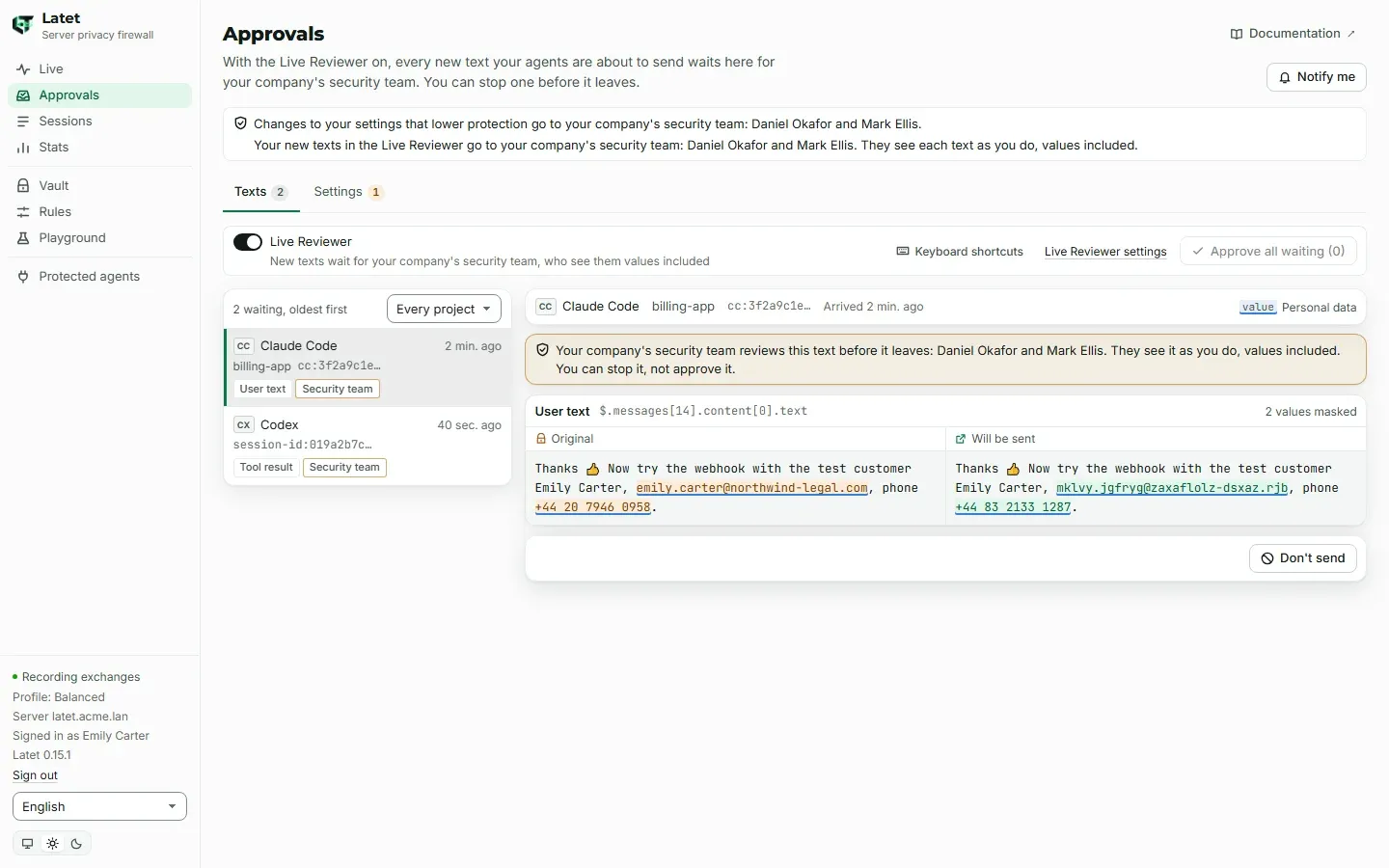
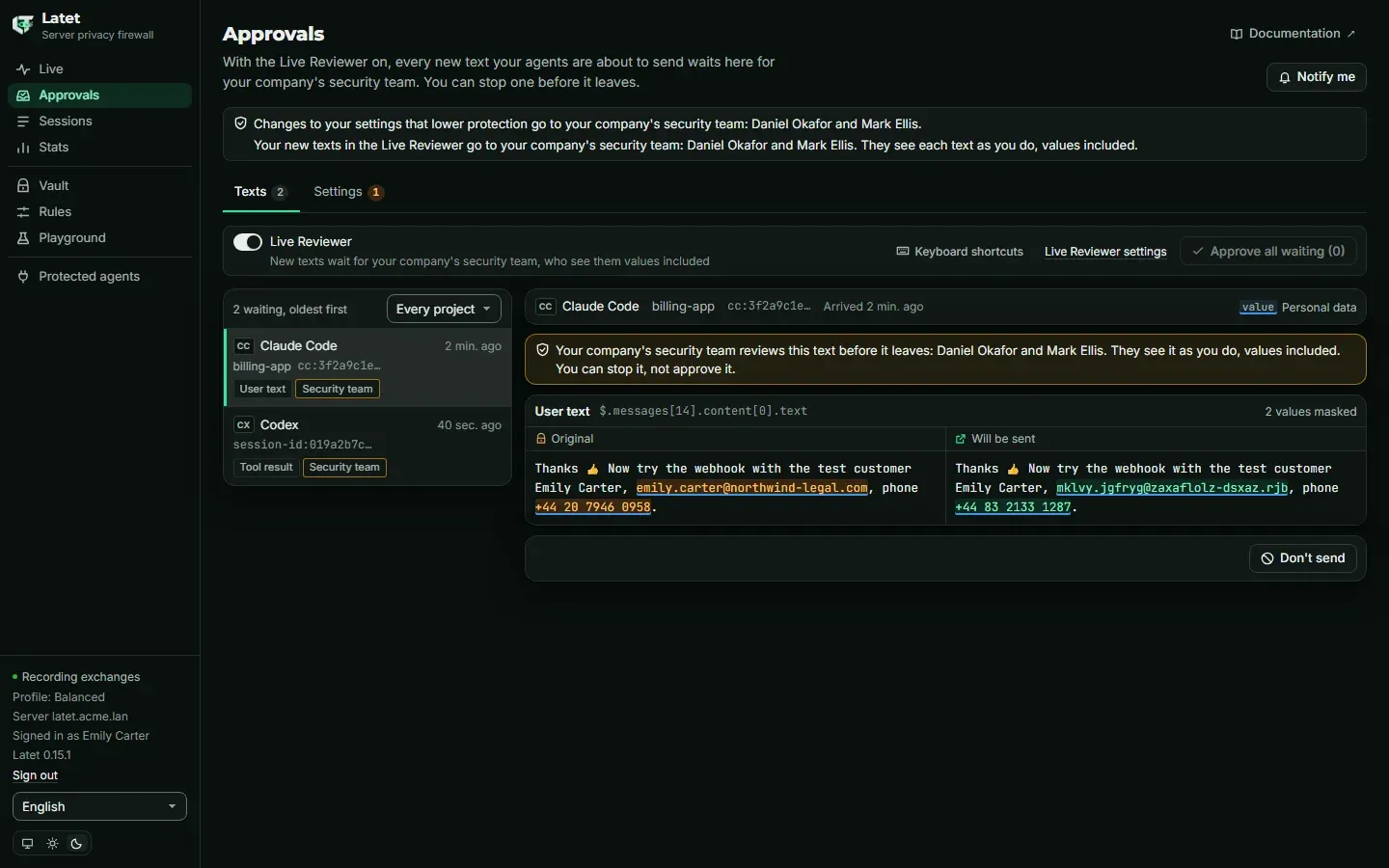
- In the dashboard, the Approvals page says what goes to the security team and who is in it, twenty names at most and how many others, or that nobody can decide yet. A change waits there with waits for your company’s security team and their names; a text waits with a note saying the security team reviews it, and sees it. The person can Undo it, or Don’t send the text; approving is the security team’s.
- A save in the dashboard that lowers protection does not apply: it waits like the others, and the page says so, with the settings in use in the form.
- In Claude Code, the status line says waiting for your company’s security team to approve it, and a message says once a session who reviews the texts, or that nobody can decide yet. No dashboard needs to be open. Agents that go through the server’s addresses wait the same way, and Claude Code running with an API key’s token is told the same.
When the security team decides on a change, the person’s dashboard says who approved it, or did not. A change approved after the person’s settings changed is dropped as stale, as it would be for them: they ask again. The longer a change waits, the likelier this is. When their settings change on another of the server’s instances just as it is approved, or cannot be saved then, the dashboard shows two messages, one after the other: that it was approved, then that their settings did not take it. They ask again.
A text the security team approved leaves only as they saw it. If the person’s own settings, the settings set for everyone, or their vault (a value forgotten there) change between the approval and the sending, so that it would leave masked otherwise, it is not sent: the dashboard says so, and for agents that go through the server’s addresses the request’s page explains why. When the agent sends it again, it waits for the security team again. The same holds when Latet refuses its request after the approval and before it leaves, for any other reason: it is not sent, and sent again, it waits for the security team again.
What the security team sees
Section titled “What the security team sees”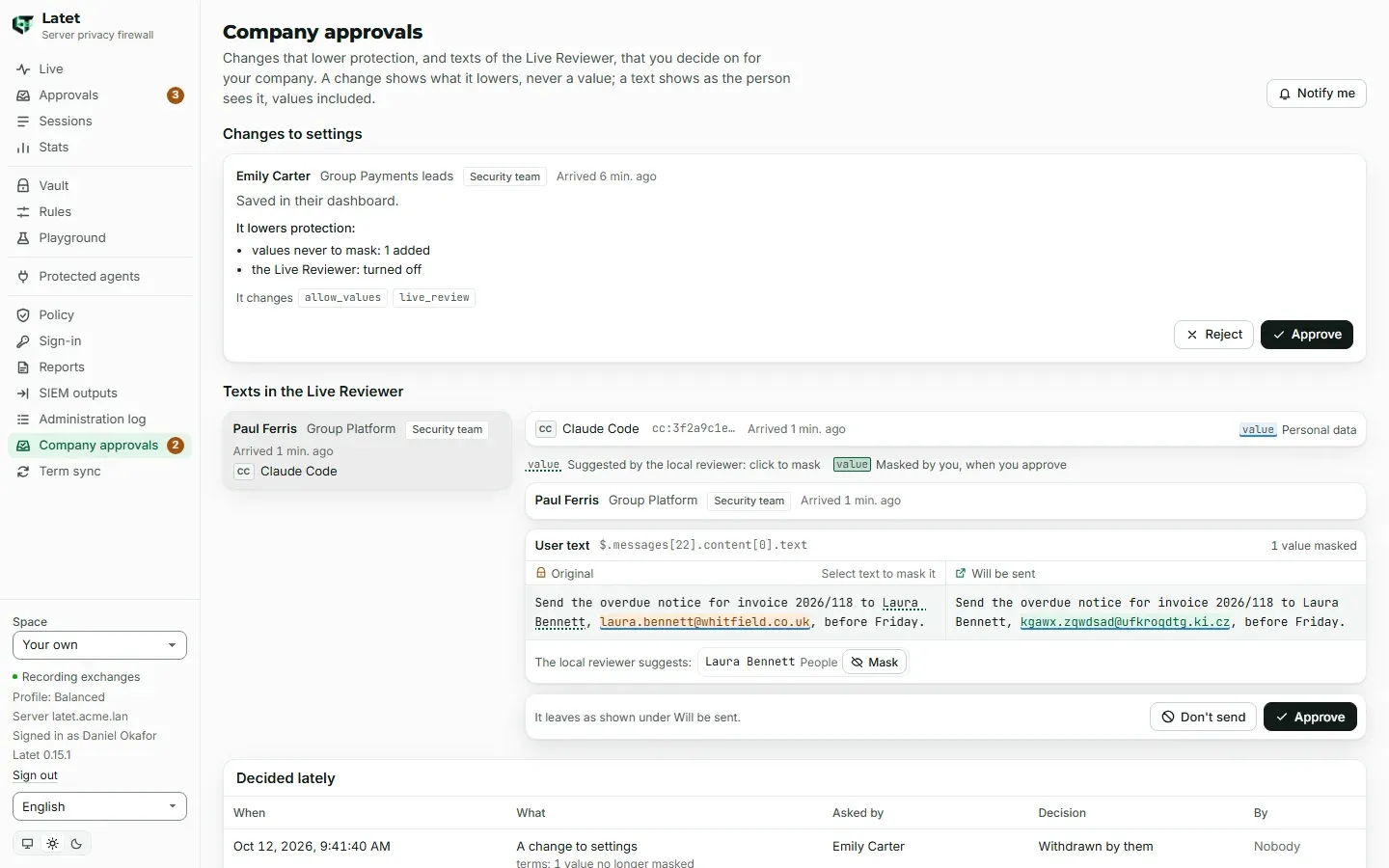
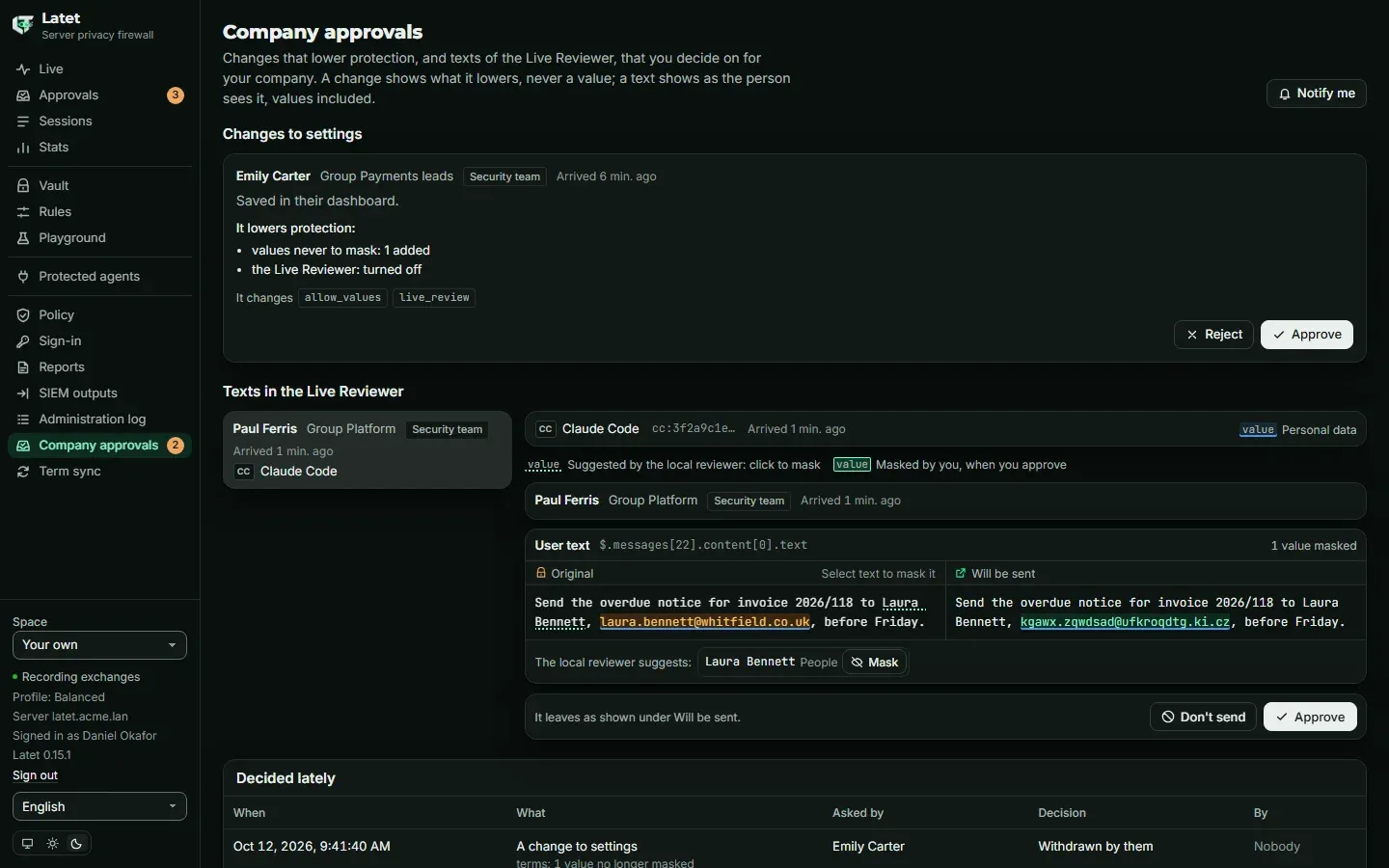
The Company approvals page is shown to the people who decide something: the security team, the people who control an API key, and the admins (for the keys nobody else controls). Nobody else sees it, and it is not reached from an API key’s space.
- Changes to settings: who asked (for an API key, who made the change in its space), their group, who decides, when, where the change came from, what it lowers and which settings it changes. Approve applies it to that person’s or that key’s settings; Reject leaves them as they are.
- Texts in the Live Reviewer: listed by who sent them, their agent and how many; a text is shown when you open
it, the original next to what will be sent, and only in a dashboard session opened with your company account: one
opened with
latet dashboardlists the texts and opens none. Mask more before you approve, or Don’t send. A value you mask is masked in that person’s vault from then on; the person can forget it there, as any value of theirs. If the text is masked again while you look at it (their settings or their vault changed), Approve shows it as it is now and decides nothing: check it, then decide. - Decided lately: what was decided, by whom and when, with what each change lowered. Never a text. Nobody where nobody decided (withdrawn, out of time, given up, gone, replaced); Not recorded where it was decided but the record did not learn by whom.
Your own requests show there too, marked You asked for it: someone else decides on them, and Withdraw stops one.
The menu shows how many items wait for your decision, and with Notify me the browser tells you when one arrives while
you are in another tab. The page lists the oldest 200; past them, a line says how many more wait, and they show as these
are decided. Nothing has a time limit: a change waits until someone decides. A text keeps the person’s Live Reviewer
time limit (timeout_s), if they have one, and leaves the queue when their agent gives up.
While the sign-in settings ask for the company’s sign-in for what applies to everyone (company_changes: sso), a
decision takes a dashboard session opened with it: one opened with latet dashboard reads the page and decides
nothing. A text takes it always.
Whichever of the server’s instances serves you, your decision reaches the request waiting on another: what waits is kept in the server’s database and in Valkey, not in one instance. If Valkey is restarted, the texts waiting in it are lost and leave the queue as given up; the changes are kept. A request of an account that is disabled or removed meanwhile leaves the queue as gone, since nobody can carry a decision out there: enabled again, the person withdraws a change that still waits, and asks again.
When the license changes
Section titled “When the license changes”When the license expires or is paused, what waits keeps its route and the security team keeps deciding. When a trial
ends, the page lists what waits and nobody decides: a text is not opened, since no decision can follow, and the menu
counts nothing. Whoever asked can still withdraw it from their own Approvals page; a change made in an API key’s
space waits until a license is installed, since the key’s space closes when a trial ends. What opens after the end
still goes to the security team, where nobody decides, until the server’s administrators install a license file or
remove the trial’s license. Nobody decides either while the license file cannot be used (changed or unreadable), until
it is put right. When the license is removed, or no longer lists approvals, what waits stays as it is: whoever asked
withdraws it from their own Approvals page and asks again, and it then waits for them (an API key’s space opens only
with a license that lists roles). A text has no time limit unless the person set one, so their agent waits until they
stop it. Installing or removing the license is an administrator’s act, in the administration log. While changes or the
Live Reviewer’s texts go to the security team, removing the license, or installing one that does not list approvals,
hands the decision back to whoever asks for the approval; so does installing one that lists roles but not approvals
while the server has an API key, whose changes then go to whoever makes them in the key’s space instead of its other
controllers. The License page, latet server license install and latet server license remove ask first, and the
entry in the administration log says that central approvals stop.
This is different for a request exception while the license still lists locked rules and the policy says
exceptions: company: once the license no longer lists approvals, one asked for again waits for an approval that can
only reject it, since only the security team approves one there (Locked rules). When the
license is removed, or lists no locked rules, the policy is no longer in force, and request exceptions are each person’s
again.
What is recorded
Section titled “What is recorded”The server keeps every decision in its database for as long as it keeps the administration log
(LATET_SERVER_AUDIT_RETENTION_DAYS, a year by default): who asked, who decided, when, and what a change lowered, which
it keeps sealed with its key. Never a text or a value. Of what ended, it keeps the latest 1,000 items of each person or
API key; the administration log keeps every decision taken on Company approvals all the same. How each item ended:
| State | On the page | What happened |
|---|---|---|
approved |
Approved | Approved: the change applied, or the text left |
rejected |
Rejected | Rejected: the settings stay as they are, or the text was not sent. In an API key’s space, this is also a change or a text stopped there by someone who did not ask for it, named under By |
withdrawn |
Withdrawn by them | Whoever asked withdrew it |
stale |
Dropped: their settings changed | Approved after the person’s settings changed: nothing applied, and they ask again |
superseded |
Replaced by a newer one | A newer change replaced it in that space |
expired |
Not sent: its time ran out | A text that waited past the person’s timeout_s |
abandoned |
Given up by the agent, or lost | A text whose agent gave up, or that Valkey lost in a restart |
gone |
Gone: the account was disabled or removed | The account that asked was disabled or removed, or the change was no longer where it waited: nobody can carry a decision out |
approved-unapplied |
Approved, not applied | Approved, but the person’s settings changed on another instance meanwhile, or could not be saved, and did not take it: they ask again |
approved-changed |
Approved, not sent | A text approved, then not sent: it would have left masked otherwise than the decider saw it, or its request was refused before it left |
Each decision taken on Company approvals is also in the administration log, written before it is carried out:
approval.decided for the security team’s, key.approval.decided for an API key’s controllers’, key.approval.admin-decided
for an admin’s on a key nobody else controls. Whoever withdraws their own request there leaves an entry marked
withdrawn. The entry is the decision taken; the record says how it ended. So an entry can stand for a decision that
was not carried out: the person’s space could not be reached from that instance, or the text was masked again between
the server’s last check and the decision. The decider is told, and decides again, which writes a second entry. A
decision whose entry cannot be written is not carried out (503), and the page says so. A change or a text whose record
cannot be written when it opens does not wait: the save is refused (503) and nothing applies, or the text is not sent.
Opening another person’s text is in the administration log too, written before anything of it is shown:
approval.opened, once for each decider and each text, whether they open the text itself or one of its images, and
however often. The entry names who opened it and whose text it is, never the text or an image. A text whose opening
cannot be written there is not shown (503). Whoever opens their own text leaves no entry.
An approval the person’s settings could not take, because they changed on another instance meanwhile or could not be
saved, is said to whoever decided and to the person, and the record keeps it as approved, not applied; the person asks again. Its
change event says approved, the decision taken, as the approval event of a text approved and then not sent does.
Before a decision the person’s settings are read again: a newer change of the shared settings found then replaces the
one decided, and the decision answers that it no longer waits.
With reports, every end is an event (approval for a text, change for a change), the person’s own
included, with who decided when it was someone else. The metrics count what waits
(latet_approvals_company_waiting) and what was decided (latet_approvals_company_decided_total, where
approved-unapplied and approved-changed are counted again among the approved).
Administrators keep the last word: they give the security role and control of a key, and they install or remove the license. Each of these acts is in the administration log, which is where to look for who could decide.
Commands
Section titled “Commands”| Command | What it does |
|---|---|
latet server approvals show |
Who decides on changes and on texts |
latet server approvals set --changes … --live-review … |
Change who decides (self or security for each); kept in the administration log |
latet server log --action approvals.changed |
Who changed who decides, and when |
latet server log --action approval.opened |
Who opened whose texts, and when |
latet server log --action approval.decided |
The security team’s decisions, by whom and when |
latet server log --action key.approval.decided |
The decisions of API keys’ controllers |
latet server log --action key.approval.admin-decided |
The admins’ decisions on keys nobody else controls |
© 2026 Emanuele Casabona · VAT IT02293040990 · Privacy policy · Legal notice · latet.ai