

Sign-in, groups and roles
On a Latet server with Latet Enterprise, people sign in to the dashboard with their
company account through OpenID Connect; your identity provider creates, changes and disables their accounts and pushes
its groups through SCIM; roles, given to people or to groups, decide who sees and changes what; and the people or
groups you choose control your API keys. The license lists sso for sign-in and provisioning, and roles for groups,
roles and the control of API keys: see Enterprise Edition.
Latet speaks OpenID Connect, which Microsoft Entra ID, Microsoft AD FS, Okta, Google, Keycloak, Authentik and Auth0 offer. It does not speak SAML 2.0: if your provider offers only SAML, Keycloak stands between the two, as SAML only? says.
Single sign-on
Section titled “Single sign-on”At your identity provider
Section titled “At your identity provider”Which provider do you have? Ask your IT team first. A company on Microsoft 365 already has Microsoft Entra ID, even
when the office keeps its own Active Directory and Microsoft Entra Connect syncs it there, and that is the simplest
choice. Microsoft’s public realm check, https://login.microsoftonline.com/getuserrealm.srf?login=<a work address>,
says whether a domain is managed by Entra ID ("NameSpaceType":"Managed"), federated to another provider such as
AD FS ("Federated", with that provider’s sign-in address in AuthURL), or unknown to Entra ID ("Unknown", as for a
company with Active Directory alone). A federated domain still signs in through Entra ID, which hands people on to its
provider. An AD FS that speaks OpenID Connect answers at https://<host>/adfs/.well-known/openid-configuration. A
company with Active Directory alone uses AD FS, or Keycloak in front of Active Directory: both are below.
Register Latet as a web application that signs in with the authorization code flow, and note its client ID and client
secret. Its redirect URI is your server’s address followed by /_latet/sso/callback:
https://latet.acme.lan/_latet/sso/callbackGive Latet to a group, latet-users for example: only its members get an account. To put people in Latet’s groups
when they sign in, have the provider put their groups in the ID token.
-
Microsoft Entra ID: an app registration with this web redirect URI and a client secret; a groups claim (Token configuration) limited to the groups assigned to the application, which also keeps a token under the 200 groups it can carry; on its enterprise application, assignment required, with
latet-usersassigned. The issuer ishttps://login.microsoftonline.com/<tenant ID>/v2.0. Entra ID sends the groups’ IDs: write the IDs ingroupsandaccess_group. -
Microsoft AD FS (Windows Server 2019 or later): in AD FS Management, Application Groups, Add Application Group, with the template Server application accessing a web API. Note the server application’s Client Identifier, add this Redirect URI, and Generate a shared secret, which is the client secret. The web API’s Identifier is that same Client Identifier, and its permitted scopes are
openidandallatclaims. In Latet, the issuer ishttps://<adfs host>/adfs, withscopes: [openid, allatclaims]anduser_name_claim: upn.Connected directly, AD FS gives Latet the user name and not the groups: it puts the
upnclaim in the ID token, and adds other claims only to an answer sent back by form post, which Latet does not ask for. So leaveaccess_groupout, since with it every sign-in is refused.groupsputs nobody in a Latet group either: give roles to people, or to groups whose members you add by hand. Setaccounts: scim, for the accounts you add and link yourself (below):opengives an account to everyone AD FS signs in. A company that needs groups puts Keycloak in between, with AD FS added to it as a SAML provider, as SAML only? says, or Keycloak in front of Active Directory, below. -
Okta: an OIDC web application assigned to
latet-users, with a groups claim namedgroups, filtered to the groups that matter. The issuer is your Okta address, or that of its authorization server. -
Google: an OAuth client of type web application, with an internal consent screen. Google sends no groups: leave
access_groupandgroupsout, setuser_name_claim: email, and name your Workspace domains inallowed_domains: Latet then accepts only ID tokens whosehdclaim is one of them, which consumer Google accounts do not have. Without SCIM,accountsisopen(everyone those domains sign in gets an account) orscim(the accounts you add and link yourself, below). -
Keycloak: a client with client authentication on and the standard flow, with a Group Membership mapper (claim
groups) in its dedicated scope. The issuer ishttps://<keycloak>/realms/<realm>. Keycloak writes a group with its path (/latet-users); Latet takes either form. -
Keycloak in front of Active Directory, for a company with Active Directory alone. In the realm’s User federation, an LDAP provider with Active Directory as its Vendor and a Connection URL that begins
ldaps://, with the directory’s certificate authority in Keycloak’s truststore: over plainldap://without Enable StartTLS, the passwords Keycloak checks against the directory cross the network unencrypted. Then a read-only account in Bind DN and Bind credentials, Edit modeREAD_ONLY, the people’s branch in Users DN, andsAMAccountNamein Username LDAP attribute: it becomes the Keycloak user name, which Latet receives aspreferred_username. On the provider’s Mappers tab, Add mapper of the typegroup-ldap-mapper, with the groups’ branch in LDAP groups DN, ModeREAD_ONLY, and Preserve group inheritance off, so that a group nested in another reaches Latet as/latet-usersrather than under its parent’s path;LOAD_GROUPS_BY_MEMBER_ATTRIBUTE_RECURSIVELYin User groups retrieve strategy still counts nested groups. Latet then connects to that realm as the Keycloak item above says. Keycloak is one more service to run, update and keep available, and it decides who gets in. -
Authentik and Auth0: an OIDC web application with this redirect URI; name their groups claim in
groups_claim.
For AD FS, for Keycloak in front of Active Directory and in the two sections below, the names of menus and settings are the ones Microsoft’s documentation and Keycloak’s (Keycloak 26) give, in English.
Two choices at the provider keep sign-in safe:
- The user name claim (
user_name_claim) is one your people cannot change themselves at the provider. Whoever can set it to someone else’s user name signs in as that person’s account. A provider may let people edit their e-mail address or their display name: check yours before usingemail. - Groups are named by their ID where the provider sends it (Entra ID does), in
access_groupand ingroups: a group’s name can be taken by anyone who can make a group of that name at the provider, its ID cannot. Do not useaccess_group, or a mapping to a Latet group that holds a role, with groups that people other than your administrators can make or rename at your provider.
SAML only?
Section titled “SAML only?”Latet keeps speaking OpenID Connect alone: Keycloak speaks SAML to your provider and OpenID Connect to Latet. In a Keycloak realm:
- Identity providers, SAML v2.0: load your provider’s metadata in SAML entity descriptor, or write its
Identity provider entity ID and Single Sign-On service URL by hand, with its signing certificate in
Validating X509 certificates and Validate Signatures left on. Keep NameID policy format at
Persistent, or choose a Principal type that stays the same for a person: with a transient NameID, Keycloak makes a new user at each sign-in, and Latet a new account. - At your provider, register Keycloak with the metadata linked from its Endpoints, SAML 2.0 Service Provider Metadata, and have it send each person’s groups as an attribute.
- On the identity provider’s Mappers tab, map what your provider sends: an Attribute Importer for a person’s
e-mail or name, and an Advanced Attribute to Group mapper for each group that matters (
latet-users, and the groups ofgroups), which puts a person in a Keycloak group when their assertion holds that group’s value. With Sync modeForce, a person’s groups are taken again at each sign-in. - In Authentication, set the browser flow’s Identity Provider Redirector to your provider as its Default Identity Provider, so that people go straight to it.
- Connect Latet to Keycloak as the Keycloak item above says: a client with a Group Membership mapper, and the
issuer
https://<keycloak>/realms/<realm>.
Your provider sees a SAML sign-in from Keycloak, and Latet an ordinary OpenID Connect sign-in. Keycloak is one more service to run, update and keep available, and it decides who gets in: whoever administers it can sign anyone in to Latet.
Windows sign-in without a password on the office’s computers
Section titled “Windows sign-in without a password on the office’s computers”On a computer joined to the company’s domain, Windows can sign a person in to the provider with Kerberos (SPNEGO), so that Latet opens without a password typed. One of these does the Windows part, and Latet sees an ordinary OpenID Connect sign-in either way:
- Keycloak, with a Kerberos user federation provider, or Allow Kerberos authentication on its LDAP
provider in front of Active Directory: each takes the Kerberos realm, the Server principal
HTTP/<keycloak host>@<REALM>and, in Key tab, the keytab file of that service principal, which holds its key: only Keycloak’s process may read it. In the realm’s browser flow, the Kerberos step goes from Disabled to Alternative: a browser that cannot do Kerberos gets the usual sign-in page. Latet connects to it as the Keycloak item above says. - AD FS, whose Windows Integrated Authentication is on by default for sign-ins from inside the company’s network.
Edge is on its list of browsers from the start; others are added to that list, its
WiaSupportedUserAgentssetting (Set-AdfsProperties). - Microsoft Entra ID’s seamless single sign-on (Seamless SSO), for computers joined to Active Directory: Enable single sign on in Microsoft Entra Connect, with password hash synchronization or pass-through authentication. On Windows 10 or later joined to Entra ID, or hybrid joined, Microsoft recommends its Primary Refresh Token instead, which signs people in without a password already.
In each case a browser sends Windows’ sign-in only to an address it trusts for it: on Windows, the Local intranet zone,
which Edge and Chrome follow unless their AuthServerAllowlist policy says otherwise, and which Group Policy sets for
everyone (Site to Zone Assignment List); in Firefox, network.negotiate-auth.trusted-uris. That address is
Keycloak’s, AD FS’s, or Entra ID’s https://autologon.microsoftazuread-sso.com. Keycloak, or AD FS where the company
does not run it already, is one more service to run, update and keep available, and it decides who gets in.
On the server
Section titled “On the server”An administrator sets single sign-on up on the Sign-in page of the dashboard, or with latet server, run with the
server’s administration token, from a file:
sso: issuer: https://login.microsoftonline.com/4f2c9a71-3b8e-4d5a-9c6f-2e1b7d8a0c35/v2.0 client_id: 8b1e6f3a-52c4-4e9d-a7b2-0f9c3d6e1a84 accounts: group access_group: 6e2f4a8c-1b3d-4f5a-8c7e-9d0b1a2c3e4f groups: 2d7e9b14-6c3a-4f8e-a1d5-90b8c7e6f342: Payments leadslatet server sign-in set sso.yamllatet server sign-in secret # asks for it without showing it, or reads it from standard inputlatet server sign-in testThe settings are kept in the server’s database and every instance uses them; the client secret is sealed with the
server’s master key for the issuer it was saved for, and never shown again. latet server sign-in test asks the
provider for its discovery document and its keys; a real sign-in checks the secret.
| Key | What it is | Default |
|---|---|---|
issuer |
The provider’s address: Latet reads <issuer>/.well-known/openid-configuration. https://, or http:// on the server itself, for a test. |
required |
client_id |
Latet’s client ID at the provider. | required |
client_secret |
The name of the saved secret, which begins sso-, never the secret itself; null for a client without one. |
sso-client-secret |
scopes |
What Latet asks the provider for, openid among them. |
[openid, profile, email] |
user_name_claim |
The claim that names a person at your provider. Latet matches it, at a person’s first sign-in, with the user name SCIM sent or that an administrator linked them by. Capitals A to Z do not matter, and every other character must be the same: a letter that only looks like another (a Kelvin sign for a k) makes another user name. | preferred_username |
groups_claim |
The claim that lists the person’s groups; a dotted path (realm_access.roles) works too. |
groups |
accounts |
Who gets an account at a first sign-in: scim (the people your provider created through SCIM and the people an administrator linked: nobody else), group (the members of access_group) or open (everyone your provider signs in: each one counts in the license). |
required |
access_group |
A group of the ID token, by its name or its ID as the provider sends it (capitals do not matter). With group its members get an account, and with group or scim only its members can sign in. Required with group; left out with open. |
none |
allowed_domains |
Google’s Workspace domains, such as acme.com: the ID token’s hd claim must be one of them. Only for Google, which needs it. |
none |
groups |
A group of the ID token, by its name or its ID as the provider sends it (capitals do not matter), and the Latet group its members are put in, made when missing. Not used with accounts: scim: SCIM pushes the groups. |
none |
company_changes |
Whether the dashboard’s changes that apply to everyone (below) take a session opened with your company account (sso) or any administrator’s session (any-session). Set with latet server alone. |
sso |
There is no default for accounts: write the one you mean. scim is the narrowest, and open is for a provider that
already limits who may sign in to Latet; latet server status warns of open. A change to groups applies to everyone
at once, from the groups each person had at their last sign-in.
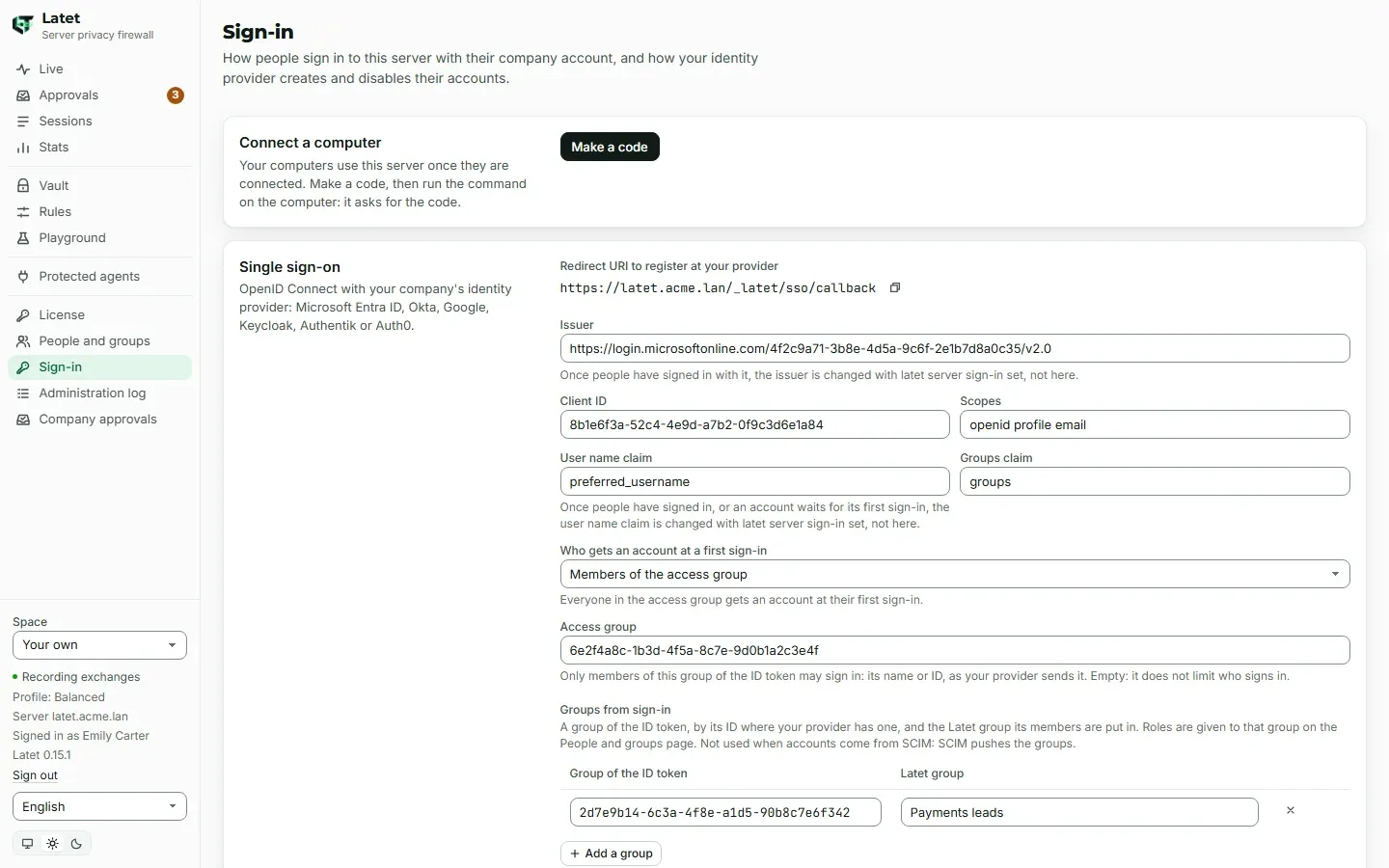
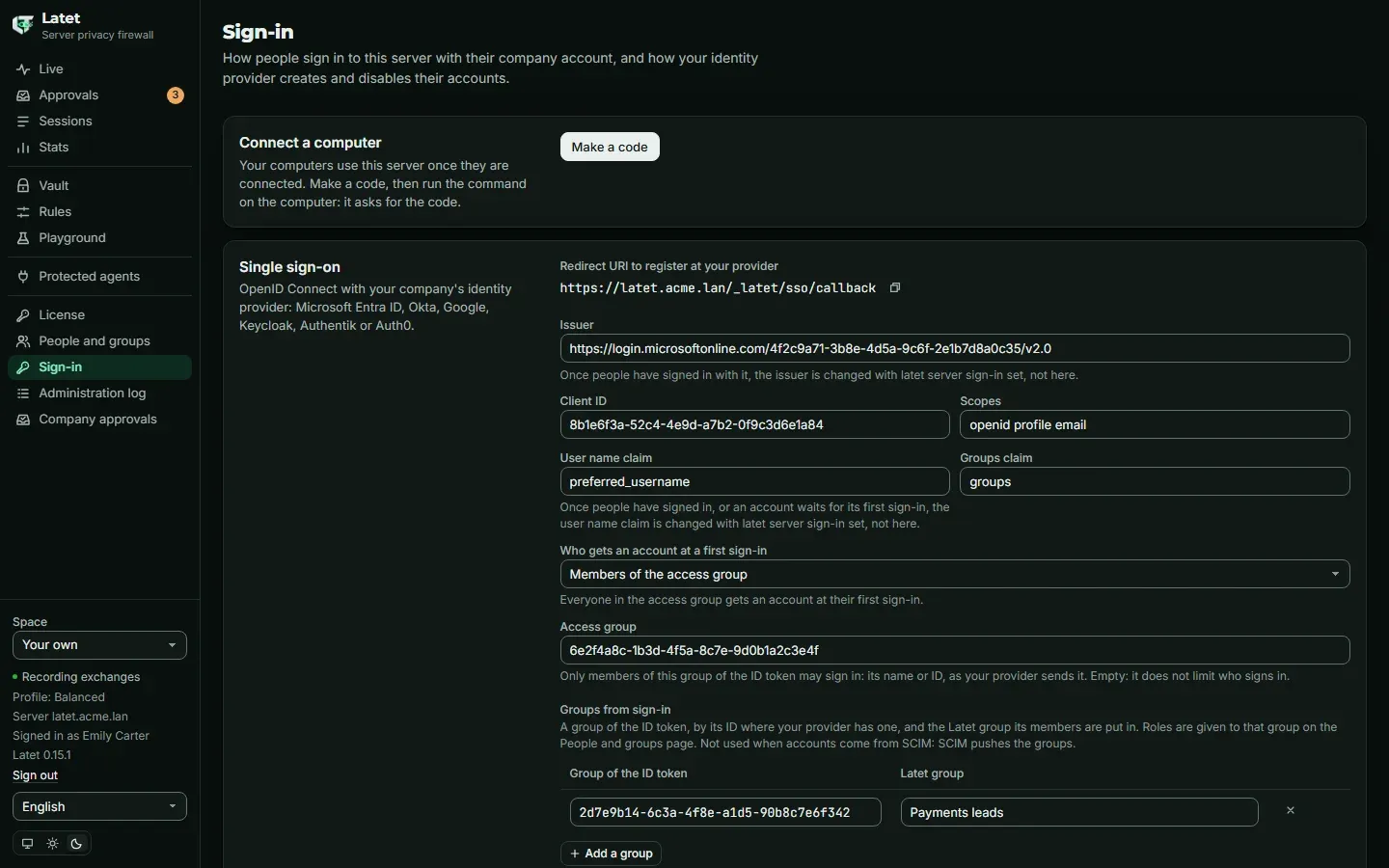
How a sign-in goes
Section titled “How a sign-in goes”- The dashboard’s sign-in page shows Sign in with your company account. Latet sends the browser to your provider with a one-time PKCE challenge (RFC 7636), and accepts the way back only in the same browser, within ten minutes.
- The way back may reach another instance of the server than the one the sign-in began on: what the sign-in needs waits in the server’s Valkey for those ten minutes, sealed with the master key. Latet counts the sign-ins begun and not yet finished: at most 20,000 wait at once on the whole server, far more than a company signing in at the start of the day, at most 100 of them begun from one address (an IPv6 address counts with the rest of its /64; people behind one NAT or proxy share its address, and so its 100), and at most 1,000 begun from one IPv6 /48 network. A sign-in is finished when the browser comes back from your provider, signed in or not; one never finished stops counting after ten minutes. Past any of these counts, a new sign-in is told that single sign-on is not available now, until one of those waiting finishes or ends.
- Latet swaps the code for an ID token at your provider and checks it: its signature, with the keys your provider publishes; who issued it; that it was issued for Latet’s client ID; that it has not expired; and the one-time value of this sign-in. A token signed with the client secret, or not signed, is refused. Nothing else of your provider is used: no access token, no user information.
- Who it is: the account that has the same subject (the provider’s ID for the person, with the issuer’s address);
else an account your provider’s SCIM created, or that an administrator linked, with the same user name, which nobody
signed in to yet and whose user name SCIM has not changed since; else a new account, when
accountsisgroupand the person is inaccess_group, or isopen. Withscimnobody else gets one: the sign-in is refused as not provisioned. A person added by hand is never found by their user name or their e-mail: they link their own account, or an administrator does (below). - E-mail: the
emailclaim becomes a person’s e-mail, and counts for matching, only when the provider saysemail_verifiedis true, as a JSONtrue: a provider that sends the text “true” (Amazon Cognito does) is read as not verified. Withuser_name_claim: email, a token whose e-mail is not verified is refused. An unverified e-mail never decides who someone is; a verified one does so only as the user name claim, or when a person links their own account (below). - Groups from sign-in are applied at each sign-in, unless
accountsisscim. The groups a person was put in by hand stay. - The session lasts 12 hours from its opening, on every instance, as one opened with
latet dashboard, which keeps working. - The server reaches your provider’s discovery document, its keys and its token endpoint over HTTPS, with the system’s
certificates, and nothing else, at the addresses it resolves and checks at each connection: your company’s own
network is allowed, the server’s own machine only when the address names it, and never a link-local address such as
a cloud’s metadata address, even when a name is pointed there after it was saved. A name with several addresses is
reached at the next one when the connection to the one before is refused or not made in time, before anything is
sent. Over HTTPS, a provider on the server’s own machine works at
localhostas at127.0.0.1, since its certificate is checked at every address: one in Docker that listens on 127.0.0.1 alone is reached atlocalhosttoo, though Windows giveslocalhost’s IPv6 address first. Anhttp://issuer, allowed on this machine alone and for a test, is written as the address the provider listens on (127.0.0.1or[::1]), never aslocalhost:localhostis tried at::1first, and any program on the server that listens there would be sent the client secret. Each answer is read up to a size limit. - Each sign-in, and each refused one, is an event of type
sign-inwith the person’s ID and the outcome, never their name or e-mail. A first sign-in that makes an account is in the administration log.
When a sign-in is refused, the sign-in page says why: it took more than ten minutes or was used already, the company
account is not in access_group (or its domain is not in allowed_domains), it is linked to no account on this server
(SCIM has not created one and no administrator linked it), the account is disabled, single sign-on is not available
now, or it could not be finished, which the server’s log explains.
Without SCIM, Latet learns that someone left only when they try to sign in again: a person removed from access_group
is refused, and keeps their account until you disable it, on the People and groups page or with
latet server people disable. A person disabled at your provider is refused there, on the provider’s own page, and
Latet is not told: their account stays enabled, and a session they opened before keeps working until its 12 hours end.
With SCIM, your provider disables them at once.
Linking an account
Section titled “Linking an account”A person added by hand (latet server people add, or Add a person) is not found by their first sign-in: an
attribute your provider lets its users change would otherwise hand their account to whoever sets it, an administrator’s
included. Someone who is not linked is told so on the Sign-in page, and links their own account there: Link my
company account (the server’s /_latet/sso/link) signs them in at your provider once, and Latet links the company
account to theirs only when the ID token names them as their account does. An account that has a user name takes the ID
token whose user name claim is that user name, and nothing else; an account with none takes the ID token whose verified
e-mail is the one given them by hand or by SCIM. An account whose user name SCIM changed takes none until an
administrator links it. Otherwise the link is refused as not provisioned, and an administrator links them:
latet server people link emily.carter@acme.com --user-name emily.carter@acme.com--user-name is the person’s user name at your provider. Their first sign-in then finds their account. A person is
linked once. The link is made with the same redirect URI: there is nothing more to register at your provider.
Changing the issuer
Section titled “Changing the issuer”The client secret is kept for the issuer it was saved for. When the issuer changes, save it again
(latet server sign-in secret) before anyone signs in. Once people have signed in, only latet server sign-in set
changes the issuer, since their accounts are linked to the one before. The same goes for user_name_claim once people
have signed in or an account waits for its first sign-in: the claim decides whose company account finds that account.
For the same reason, once people have signed in or an account waits, the dashboard does not turn single sign-on off,
whatever company_changes says: turned on again, it would take a new issuer or claim unchecked.
latet server sign-in off does it. While accounts wait for their first sign-in, whoever sets up single sign-on
chooses the issuer and the user name claim they will be claimed by, and the change is recorded in the administration
log. After a new issuer, link people again, one command after the other:
latet server sign-in set sso.yamllatet server sign-in secretlatet server people unlink --alllatet server people link --alllink --all links again, by their user name, every enabled person whose account has one; the people SCIM manages stay
with SCIM. It never links someone whose user name SCIM changed, if no sign-in with that user name and no administrator’s
link has confirmed it since (see Provisioning with SCIM): it lists them, each with the
command that links them, to run once your provider confirms the user name.
With --scim, the others are handed to SCIM too, except the holders of a role (given to them, or to a group made by
hand), who are handed over one by one: latet server people link <id> --user-name <name> --scim. Until a person is
linked again, their sign-in does not find their account. Run a second time, link --all (with --scim or without)
leaves out the people an earlier run linked who are still waiting for their first sign-in, says how many it left out,
and asks only about the others.
Connecting a computer
Section titled “Connecting a computer”Once single sign-on is set up, people make their own code to connect a computer: on the Sign-in page,
Connect a computer, Make a code. The code works once, for 24 hours, and is shown only now. A person may have
20 computers connected and make 10 codes in any hour; past either, Make a code says so and makes none. Computers an
administrator connected count toward the 20, and an administrator’s own codes (latet server people code) are not
limited. latet disconnect on a computer frees its place, and so does an administrator with
latet server people tokens <person> --revoke <id>. With the code, on the computer:
latet connect https://latet.acme.lanand enter the code at the prompt. With a self-signed certificate the page adds --fingerprint, as
Latet on a server says.
The dashboard tells each person, under Computers connected to your account, which computers were connected as them and which codes were made for them, by an administrator or by themselves, for 14 days or until they choose Mark as seen. Only a session opened with the company account can mark it seen. On the Rules page, under Advanced, Your computers lists for good every computer connected to their account now: when it was connected, when it was last used, and whether an administrator made the code it was connected with. If one of them was not them, they tell an administrator: disabling an account stops the tokens of its computers.
Provisioning with SCIM
Section titled “Provisioning with SCIM”SCIM 2.0 lets your provider create, change and disable people on the server, and push its groups.
- Make a token: on the Sign-in page, Provisioning, Make a token, or
latet server sign-in scim-token. It is shown once; the server keeps only a keyed hash of it. It ends after 90 days, as an administration token does (--days Nor--neveron the command line; the page makes tokens that end). Several tokens can be in use, so a new one is given to your provider before the old one ends or is removed (latet server sign-in scim-token --remove <id>). The page says who made each token: a token whose maker no longer administers still works, and is not ended when its maker is demoted or disabled, so remove it if it should stop. - At your provider, give Latet’s SCIM address,
https://latet.acme.lan/scim/v2, and the token as a bearer token. In Entra ID: the enterprise application’s Provisioning, Automatic, for the users and groups assigned. In Okta: SCIM provisioning with HTTP header authentication,userNameas the unique identifier, and Push Groups. SCIM requests are taken over HTTPS only, when the server’s address is https. - Your provider’s provisioning service calls the server from its own network: the server’s address is reachable from it, or through its on-premises agent (the Microsoft Entra provisioning agent, Okta’s On-Prem Provisioning agent).
What Latet does with it:
- A new person gets an account with their name, e-mail and user name. The other attributes your provider sends (a
title, a phone, a department) are accepted and not kept. A request that leaves out an e-mail, an
externalIdor a name keeps the one the person has. - A person’s name is the one your provider gives. Under
exceptions: company, a person linked to your provider cannot change their own name where your policy lets names through: Locked rules says which name Latet uses. - SCIM sees and changes only the people it manages: those it created, and those an administrator handed to it. A
person added by hand, or who signed in without SCIM, is unknown to it: a request about them is answered 404, and a
request to create someone with their user name or their e-mail is refused (409) until an administrator hands them over:
latet server people link emily.carter@acme.com --user-name emily.carter@acme.com --scim. Someone who signed in already is unlinked first (latet server people unlink). Your provider’s next request then takes the account over: each person counts once. - A new user name for someone who never signed in is refused (400) when SCIM did not create them (an administrator
handed them to it), or while their account holds something: a role or the control of an API key, given to them or to a
group made by hand that they are in, a computer connected to it or ever used with it, or a code waiting to connect
one. Otherwise Latet takes it, and the account then waits for an administrator to link it again: until then nobody’s
first sign-in takes it, by the new user name or the old one. A change of capitals A to Z alone is not a new user name.
On the People and groups page the account is then neither linked nor waiting for a first sign-in, and
latet server people link --alllists it apart instead of linking it. Once your provider confirms the user name, link it before the person signs in:latet server people link <id> --user-name <name> --scim. Until then their sign-in is refused as not provisioned whenaccountsisscim; withgrouporopenit makes them a new account, which you remove (latet server people remove) so that their next sign-in finds the old one. This keeps a SCIM token in the wrong hands from giving the account, and all it receives later, to someone else’s company account. active: falsedisables the account at once: the tokens of their computers and their dashboard sessions stop, on every instance, and their place in the count of users is free. Their data stays on the server.active: trueenables them again, but never lifts a disable an administrator made: the page says so.- The last administrator is never disabled or taken out of a group by SCIM: the request is refused (409).
- A person deleted at your provider is disabled, with their data kept, until you remove them
(
latet server people remove). If your provider later creates someone with the same user name (a namesake, or a person who comes back with a new company account), Latet gives them the old account only if nothing is in it: nobody signed in to it, no computer is connected to it or was ever used with it, no code to connect one waits, and no role or control of an API key is given to the person or to a group made by hand that they are in. Otherwise the request is refused (409). For a namesake, remove the old person: your provider’s next request then makes a new account. Only when the same person comes back, hand them back to SCIM on purpose:latet server people link <id> --user-name <name> --scim, afterlatet server people unlinkif they had signed in. The old account then goes to whoever has that user name at your provider, with its history, its vault, the API keys it controls, the roles given to it by hand and the computers connected to it. - A pushed group is a Latet group, with the members your provider gives it. A group made by hand with the same name is not taken over: rename one of them.
- Accounts come from SCIM when
accountsisscim: a person your provider has not created, and that no administrator linked, is refused at sign-in, and sign-ins no longer put anyone in a group. - Each change SCIM makes is in the administration log, by the token that made it. A SCIM token sets every value that
names a person SCIM manages (user name, e-mail, name), so commands that name a person, such as
latet server people codeandlatet server roles grant, are safest given the person’s ID (u_…). If a token may have leaked, remove it (latet server sign-in scim-token --remove <id>), and on the Administration log page filter Who byscim:<id>to see what it changed.
Latet answers /scim/v2/Users (GET with filter=userName eq "…" or externalId eq "…", POST, GET, PUT,
PATCH, DELETE), /scim/v2/Groups (GET with filter=displayName eq "…", POST, GET, PUT, PATCH of members
and name, DELETE), ServiceProviderConfig, ResourceTypes and Schemas. It does no bulk requests, sorting or ETags.
Groups
Section titled “Groups”A group is a set of people. It comes from your provider through SCIM, from sign-in through groups, or is made by hand
on the People and groups page or with the command line:
latet server groups add Paymentslatet server groups join Payments emily.carter@acme.comA person may be in a group in more than one way: each way changes only its own. Someone your provider put in a group leaves it when your provider says so; someone added by hand stays until they are taken out by hand. A group from SCIM is renamed and removed at your provider.
- The members of a SCIM group are people SCIM manages: a member your provider names who has no account in Latet yet, or whom SCIM does not manage, refuses the whole request, removals included, until it is mended at your provider (assign the person to Latet there, or hand them to SCIM).
- No sign-in joins a group SCIM pushed. A line of
groupsthat names one is skipped, andlatet server statussays so; a SCIM group cannot take a name thatgroupsnames (409).
On the People and groups page, administrators add people (Add a person shows their one-time code and the command
to connect a computer), make a code for someone who has not connected a computer yet (Code; for anyone else
latet server people code does it), disable and enable people, give and take back roles, make groups and put people in
them, and make API keys. Each person is shown with where their account comes from: added by hand, from your identity
provider, or made at their first sign-in; and whether it is linked to their company account, waiting for their first
sign-in (linked by an administrator or by SCIM, by their user name), or managed by SCIM. Someone added by hand who is
neither linked nor waiting is linked first (see Linking an account).
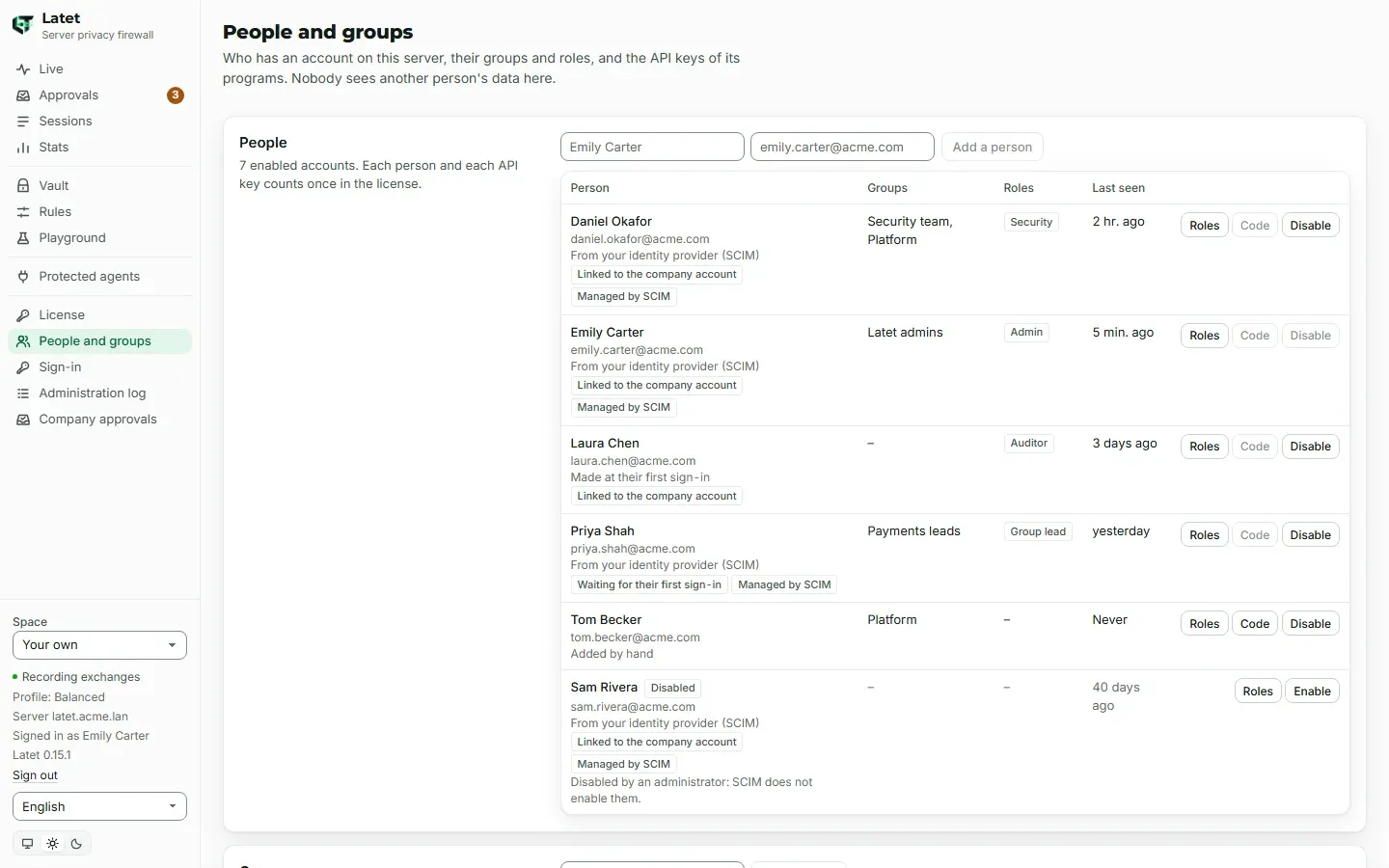
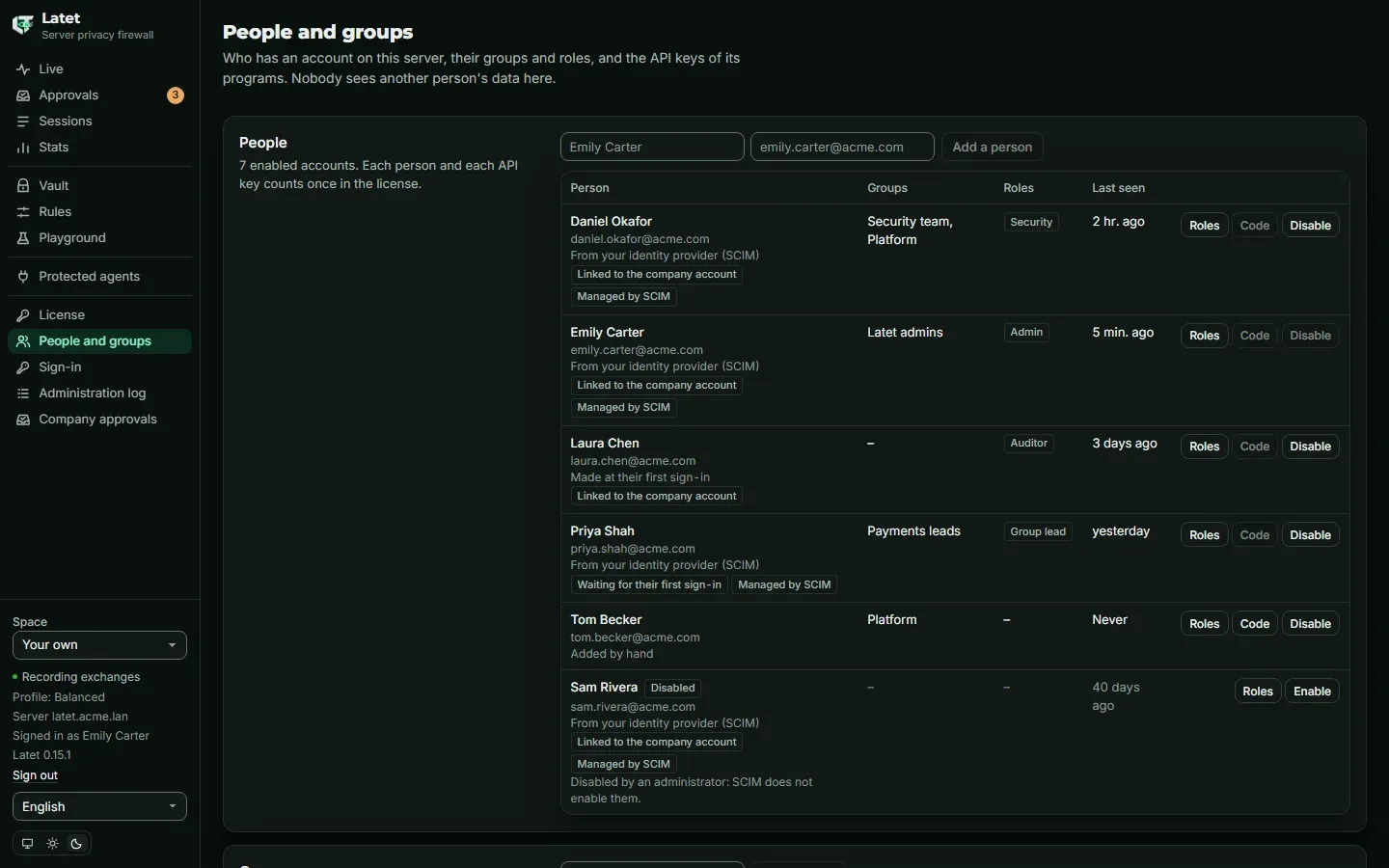
Everyone is a user. The other roles are given by hand, to a person or to a group: a group’s members have its roles, and lose them when they leave it.
| Role | Sees | Decides |
|---|---|---|
| user | their own data, and the API keys they control | their settings, above the company’s floor; a controlled key’s |
| group lead | their groups’ reports | nothing |
| security | every report | the policy, terms, approvals, SIEM |
| auditor | reports, the policy’s history and the administration log, read-only | nothing |
| admin | people, groups and API keys | sign-in, roles, the license, API keys and who controls them |
On the command line the roles are group-lead, security, auditor and admin. A group lead sees the reports of
every group they are in. No role gives a view of another person’s values, texts or history. An administrator who makes
a code for someone and connects as them is recorded in the administration log and shown to that person: in a notice
for 14 days, and in the list of their computers always (see Connecting a computer).
A role given to a group that SCIM pushes goes to whoever holds a SCIM token too, since a token can put people in that group: the People and groups page says so. Give roles to groups made by hand where that matters.
People of the security role set your company’s policy on the Policy page: they edit its text, then Save it
for every person and API key on the server, or Remove it, as latet server policy set and
latet server policy remove do. A text the server cannot read is refused with the reason, a save is refused when
someone changed the policy since its text was opened, and each change is in the administration log, by the person who
made it. Auditors see what the policy locks, never its text. See Locked rules.
The first administrator
Section titled “The first administrator”From any computer, with the server’s administration token. First the person needs an account: your provider’s SCIM
created it, you add it by hand (latet server people add "Emily Carter" --email emily.carter@acme.com), or, with
accounts: group or open, they signed in once. An account added by hand is linked to your provider by their user name
there, so that their first sign-in finds it; then the role:
latet server people link emily.carter@acme.com --user-name emily.carter@acme.comlatet server roles grant emily.carter@acme.com adminInstead of the first command, the person can link their own account from their dashboard (Link my company account,
above). A person is named by their ID (u_…, shown by latet server people list), their user name at your provider,
or their e-mail when it was given by hand or by SCIM: an e-mail an ID token brought, or one that more than one person
or a disabled person has, is refused, and the person is named by their ID. A group is named by its ID (g_…) or its
name: latet server roles grant "Security team" security. Each answer says whom the name was taken for.
Administrators then give roles on the People and groups page.
The dashboard does not let the server lose its last enabled administrator (by a role taken back, a group left or
removed, or a person disabled); latet server always can, and can always give the role while the license can manage the
Enterprise settings.
Without roles in the license, nobody changes the Enterprise settings from the dashboard: they change with
latet server. Everyone can read the Enterprise pages the license gives (License, Policy and Sign-in; the
People and groups page needs roles), so installing a license that does not list roles opens them to every
person on the server, to read. A computer without a server is the Community Edition: it has no roles, no single
sign-on and none of these pages.
API keys and who controls them
Section titled “API keys and who controls them”Programs that belong to no person, a CI pipeline or a script, use an API key. Only administrators make them, on the
People and groups page (Make a key) or with latet server keys add: each enabled key counts as one user in
the license. The key and its address are shown once.
Administrators give the control of a key to people or to groups:
latet server controllers add "Billing CI" PlatformThe people who control a key, and the administrators, open its space from their dashboard: Space in the sidebar,
or Open its space on the People and groups page. The dashboard then shows the key’s history, its values and
its settings, which they change as their own; a bar above every page says whose space it is, and
Back to your space returns. While company_changes is sso (below), an administrator who does not control the key
opens its space only in a session opened with your company account. The Enterprise pages are not part of a key’s space. A change made in a key’s space is
in the administration log, with who made it, never a value. When the control is taken back, the next request is refused,
the dashboard goes back to the person’s own space, and a live view open there ends within seconds.
A key’s values are kept in PostgreSQL, and each instance holds only those used lately. In a key’s space, the Vault
page finds a value by its type, its entry ID, its real value or surrogate written whole, or a whole word the vault keeps
it by (an address by its local part, daniel.okafor), never by a part of a word. Forget there forgets a value as
latet server keys forget does: it leaves the key’s vault, the requests of the key’s history that hold it and the local
reviewer’s remembered answers, the administration log records who forgot it (key.forgotten), and the value met again
gets a new surrogate. New key gives the key’s token a new secret, as latet server keys rotate does, and the token
keeps what it may do. Once a key has several tokens (latet server keys add-token), the one meant is rotated with
latet server keys rotate --token.
Changes that apply to everyone
Section titled “Changes that apply to everyone”Some changes apply to everyone on the server: the policy (reading its text too, which holds your company’s terms and
values), people, groups and roles, API keys and who controls them, the sign-in settings, the client secret and SCIM’s
tokens, the license, and the codes to connect a computer. An administrator opening the space of an API key they do not
control is one too: it shows that key’s history and its values. While company_changes is sso, which is the default
once single sign-on is set up, the dashboard makes them only in a session opened with your company account. A session
opened with latet dashboard’s one-time code, an administrator’s own included, reads these pages, the policy’s text
apart, opens only the spaces of the API keys the person controls, and changes only what is the person’s own or a
controlled key’s: the company account proves the person to your identity provider, and a one-time code only proves that
someone holds their computer. A change refused for that reason says to sign in with your company
account to change what applies to everyone, and the dashboard offers Sign in with your company account. Linking
one’s own account from such a session does not make it a company session: sign in again afterwards.
company_changes: any-session lets any administrator’s session make these changes: it is what a server without single
sign-on does, and the setting does not exist there. It is changed with latet server sign-in set --company-changes sso
or --company-changes any-session, never from the dashboard, which also refuses to turn single sign-on off while it
asks for the company account, or once people have signed in or an account waits for its first sign-in
(latet server sign-in off does it). AI agents are refused that command, and each change
is in the administration log. latet server is not concerned: it uses the administration token. The space of a key
the person controls, and a person’s own settings, are not concerned either.
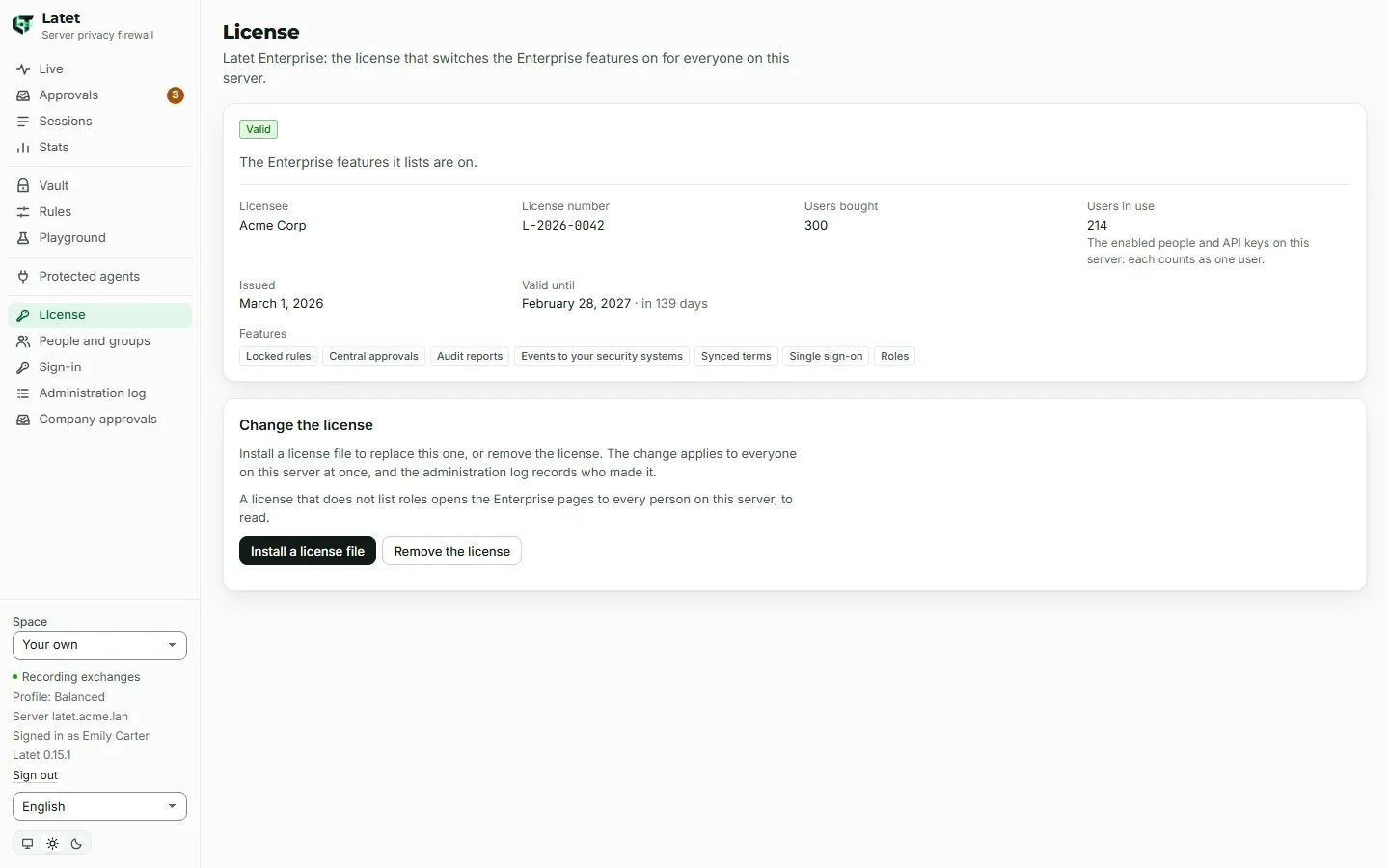
On the License page, administrators install a license file or remove the license, while the license is valid, ends
soon or is in its grace period; once it is paused, a trial ended or the file cannot be used, latet server license install
and latet server license remove do it. Removing a license, or installing one without locked-rules, stops the
server’s policy from being in force: the page asks first.
What the administration log records
Section titled “What the administration log records”Each of these is in the server’s administration log, with who did it, when and from where, never a value:
person.added, person.changed, person.linked, person.code.made, person.disabled, person.enabled,
group.added, group.changed, group.removed, member.added, member.removed, role.granted, role.revoked,
key.added, key.rotated, key.disabled, key.enabled, key.controller.added, key.controller.removed,
key.space.changed, sign-in.changed, sign-in.secret.changed, sign-in.tested, scim.token.made,
scim.token.removed, license.installed, license.removed and policy.changed. person.linked names the fields it
set, never their values; sign-in.changed names the settings a change set; sign-in.tested, a test of the provider
from the Sign-in page or latet server sign-in test, says how it went, never the provider’s address or its answer. Each call latet server makes is recorded under its route’s name too (ee.people.read, ee.groups.change
and the others), refused ones included.
When a trial ends, or the license is paused
Section titled “When a trial ends, or the license is paused”Nobody is kept out of their own Latet, whatever the license says.
- When a trial ends, sign-in with your company account stops on every instance: the sign-in page shows the
terminal’s way alone. Sessions already open last their 12 hours. People open their dashboard with
latet dashboardon a computer connected to the server; someone with no computer yet gets a one-time code from an administrator (latet server people code <person>), runslatet connect, thenlatet dashboard. Your provider’s SCIM requests are refused, but for reading, disabling a person and deleting one: a leaver is still taken off at once, and nothing is created or changed. The People and groups, Sign-in and Policy pages show what was set, read-only, andlatet server groups|roles|controllers|sign-inread it and change nothing; roles keep deciding who reads what, and nobody’s role changes. An API key’s space no longer opens. Install a license (latet server license install), or remove the trial’s file (latet server license remove) to go back to the Community Edition. - When a paid license expires or goes over its users, everything works for 30 days. Once it is paused, people still sign in with their company account, SCIM still creates, changes and disables them and pushes its groups, administrators still add, disable and enable people and API keys, and roles decide as before; groups, roles, who controls a key, the sign-in settings and SCIM’s tokens are read and not changed until a license that covers them is installed.
- When the license file cannot be used, sign-in with your company account stops as at a trial’s end, until the
file is replaced:
latet server statussays why.
How it was tested
Section titled “How it was tested”Latet’s tests sign people in against an identity provider built to the OpenID Connect specification inside the tests, send SCIM requests as Microsoft Entra ID and Okta send them, and run two instances of a server on one PostgreSQL and one Valkey: a sign-in begun on one comes back to the other, a role taken back or a person disabled on one applies at the next request on the other, and a trial that ends while people are signed in stops the company sign-in and keeps everyone in their own dashboard.
They were also run against Keycloak 26.8.2 in Docker on a development computer, set up as the Keycloak item above
says, with the issuer http://127.0.0.1:<port>/realms/<realm>, and again with http://localhost:<port>/realms/<realm>
on Windows, which gives ::1 first, while Keycloak listened on 127.0.0.1 alone and nothing on [::1], and Latet’s side
set with latet server sign-in set, secret and test. A test program did what a person’s browser does: it followed
Latet to Keycloak’s login page, posted the form with the person’s password, and followed Keycloak back to Latet’s
callback, on either instance. access_group let its members in and kept out someone outside it, whom the sign-in page
told that their company account does not give them Latet; the roles given to the groups that groups names decided what
each person read; a sign-in begun on one instance was finished on the other; with a wrong client secret the sign-in
could not be finished, and the server’s log said that the token endpoint answered 401; and a person disabled in Keycloak
was refused on Keycloak’s own page, while the session they had opened in Latet kept working.
Keycloak was also put in front of a directory as the Keycloak in front of Active Directory item says, with OpenLDAP
2.6 in place of Active Directory (uid as the user name attribute, and groups found by their member attribute, not
recursively): people signed in with their directory password, and their directory groups decided access_group and
their roles. Every other setup on this page follows its vendor’s documentation.
© 2026 Emanuele Casabona · VAT IT02293040990 · Privacy policy · Legal notice · latet.ai