

Term sync
Some lists are sensitive in themselves: a company’s customers, its people, the code names of its projects. Term sync reads them where they already are, on a schedule, and your Latet server masks every name on them as it masks your own terms, in the space of every person and API key it serves. Nobody types them in, and nobody can leave one out.
Term sync is part of Latet Enterprise: it runs on a Latet server whose license lists term-sync
(Editions and license).
Where the terms come from
Section titled “Where the terms come from”| Source | kind |
What it reads |
|---|---|---|
| A file | file |
A CSV, JSON or YAML export your CRM, ERP or HR system writes on a schedule |
| A web address | url |
The same formats from an https address |
| Microsoft Entra ID | graph |
People’s names and addresses, or the names of groups, through Microsoft Graph |
| LDAP and Active Directory | ldap |
The attributes of the entries a search finds |
HubSpot, Salesforce and other CRMs are read through an export: a report they write to a file, or publish at an address, on a schedule.
Each source maps the fields of its records to a type of term: CLIENT, PERSON, PROJECT, or another name in
capitals. The type is the label the dashboard shows, and it chooses the fake: a person’s name for a person, a company
for a company, an address for an address.
Setting up the sources
Section titled “Setting up the sources”The sources are written in YAML:
sources: - name: customers kind: file path: customers.csv every_minutes: 60 mapping: {company: CLIENT, contact: PERSON} - name: colleagues kind: graph tenant: acme.onmicrosoft.com client_id: 6f1c2b9e-4d3a-4c1e-9b7f-2a5d8e0c1f34 filter: accountEnabled eq true mapping: {"{givenName} {surname}": PERSON, mail: EMAIL}A file source reads inside the server’s term-sync folder alone: term-sync in its data folder (/data/term-sync/ in
the container, the volume the instances share). Put the exports meant for term sync there, or mount a folder your system
writes them to: whoever sets the sources can read any file in the term-sync folder, as terms, so give term sync a folder
of its own, holding only those exports. A source names a file there by its name alone, with no folder of its own; a
path elsewhere is refused, and so is a link out of the folder.
People with the security role edit the sources and set each source’s secret on the Term sync page, from a session
your company’s sign-in opened while the sign-in settings ask for one, as for every
change that applies to everyone. The server’s administrators do the same
with latet server terms, from any computer with an administration token, as with the other latet server commands:
latet server terms sources set term-sync.yaml # the server uses these sources from now onlatet server terms secret colleagues # asks for the value; it is never on the command linelatet server terms run # syncs every source now; `latet server terms run customers` syncs onelatet server terms status # what each source gave, and when it last syncedlatet server terms sources show # the sources, in the format `sources set` takesThe server keeps the sources in its Enterprise settings (the section term_sync), never in a file of its own, and
every instance uses them at once. Setting them replaces the sources before: a source taken out leaves its terms no
longer in the source (below), and latet server terms sources set asks first when it
had terms. A server takes 20 sources at most, in 64 KB.
Each source has at most one secret, its own: latet server terms secret colleagues asks for its value and the server
keeps it sealed with its master key, for that source as it is set up now. Point the source elsewhere (another address,
sign-in address, directory or account), or change what it reads with the secret (its filter, base, records, objects or
group, or the fields its mapping names), and the secret must be set again: the server never sends a secret to a place
it was not set for, nor reads other data with it. A web address’s headers count too, every one of them, and so does a
directory’s certificate. Saving the sources says which secrets must be set again, and whoever edits the sources on the
Term sync page sets the secret again then; the administration log names the fields that changed, never their
values. Setting a secret asks for a sync of that source at once. Before they ask for the secret,
latet server terms secret and the page’s Secret dialog say where the source connects, and the account a
directory signs in as: set it only if that is where it belongs.
A sync asked for runs at once on whichever instance holds term sync’s turn; latet server terms run waits up to a
minute for it and prints its result (with --no-wait, it only asks). Otherwise the server syncs each source every
every_minutes (60 by default, from 5 to 10080), the first time within a minute of setting it up, and so again once
it is changed or taken out and set up again; a source that failed is tried again after 15 minutes, or after its own
interval when that is shorter.
A change of the sources, and a secret set or removed, name the sources they were made from. When someone changed the
sources meanwhile, the change is refused, saying that the sources changed, and nothing is written: read them again,
then make it. latet server terms says to run the command again, and the page offers Read them again.
A source at the server’s own address (localhost, 127.0.0.1 or [::1]) is set with latet server terms alone: on
the Term sync page nobody adds, changes or takes out such a source, nor sets or removes its secret, and the page
keeps it as it is while it changes the others.
Every key a source takes:
| Key | Kinds | What it says |
|---|---|---|
name |
all | The source’s name: lowercase letters, digits and hyphens, 40 at most |
kind |
all | file, url, graph or ldap |
mapping |
all | Which field becomes a term of which type, 32 fields at most: {company: CLIENT}; a field may be a template of several, "{givenName} {sn}": PERSON |
every_minutes |
all | Minutes between two syncs, from 5 to 10080 (60) |
exclude |
all | Values never taken as terms, in any case, 1,000 at most |
min_length |
all | The shortest value taken as a term, from 2 to 50 (4); a person’s name from 3 characters whatever it says above that |
path |
file |
The file, by its name in the term-sync folder |
url |
url, ldap |
The address |
headers |
url |
Headers sent with the request; {secret} stands for the source’s secret |
format |
file, url |
csv, json or yaml; not set, the extension of the file or of the address’s path says, else json |
records |
file, url |
Where the list of records is in a JSON or YAML document (data.items); not set, the document itself |
delimiter |
file, url |
A CSV file’s field separator (,) |
encoding |
file, url |
The text’s encoding (utf-8; a byte order mark is skipped) |
tenant |
graph |
The Microsoft Entra tenant: its id or one of its domains |
client_id |
graph |
The application (client) id of the app registered for Latet |
objects |
graph |
users (the default) or groups |
group |
graph |
With users: only this group’s members, by its id |
filter |
graph, ldap |
An OData filter that Microsoft Graph applies; an LDAP filter ((objectClass=person)) |
login_url, graph_url |
graph |
Microsoft Entra’s sign-in address and Microsoft Graph’s, for a sovereign cloud |
start_tls |
ldap |
With ldap://: encrypt with STARTTLS before signing in (true) |
bind |
ldap |
Who Latet signs in as; not set, it signs in anonymously |
base |
ldap |
Where the search starts |
certificate |
ldap |
A certificate authority’s PEM file, by its name in the term-sync folder |
A file or a web address
Section titled “A file or a web address”A CSV file’s first line names its columns, 1,000 at most. A JSON or YAML document is a list of records, or holds one
where records says (records: data.items). A document lists 200,000 records at most and is read up to 50 MB, a YAML
document up to 5 MB, as reading YAML takes far more of the server’s memory: the sync of one past these bounds fails and
changes nothing. A file Excel exports in much of Europe has semicolons between its fields and the Windows encoding:
- name: customers kind: file path: customers.csv delimiter: ";" encoding: cp1252 mapping: {Company: CLIENT}A web address gives the same formats:
- name: projects kind: url url: https://intranet.acme.com/api/projects headers: {Authorization: "Bearer {secret}"} records: items mapping: {code_name: PROJECT}{secret} stands for the source’s secret, in a header, the path or the query; a header or a query parameter that
carries a credential must use it, and an address with a token written in it is refused. Here
latet server terms secret projects keeps the token alone.
An address is https; a local export goes in the term-sync folder. The server connects to an address its own lookup gives at that moment (the first that takes the connection: the next only when the connection to the one before is refused or not made in time, before anything is sent), inside your network too, never to a link-local or metadata address, and follows no redirect. It asks for an answer that is not compressed, and refuses one that is. The address’s certificate is checked against the server’s certificate store: add your company’s own authority there if it signs your intranet’s certificates.
What an address gives is read in its source’s format, else in the one the extension of its path says
(/export/customers.csv is CSV), else as JSON: the answer never chooses. An answer whose content type names another
format, such as text/csv for a source read as JSON, is refused, saying to set format.
Microsoft Entra ID
Section titled “Microsoft Entra ID”- In the Microsoft Entra admin center, register an application for Latet.
- Give it the application permission
User.Read.All, andGroup.Read.AllandGroupMember.Read.Allto read group names or a group’s members; grant admin consent. - Add a client secret, and keep it on the server:
latet server terms secret colleagues. - In the sources:
tenantis the tenant’s id or one of its domains, andclient_idthe application’s id.
objects: users, the default, reads people; objects: groups reads groups, mapped as {displayName: TEAM}. group
reads only the members of one group and of the groups in it: give Latet your employees, not your guests. filter is an
OData filter, such as accountEnabled eq true. The mapping names Microsoft Graph’s properties: displayName,
givenName, surname, mail, userPrincipalName, jobTitle, department. In a sovereign cloud, login_url and
graph_url give its addresses.
Latet signs in as the application, with no person signing in, and sends the token only to Microsoft Graph’s own
address. A refusal says Microsoft Entra’s error code, such as invalid_client, never its description.
LDAP and Active Directory
Section titled “LDAP and Active Directory”LDAP needs Latet’s ldap extra, which the container image has. It installs ldap3, a library under the
LGPL-3.0-or-later, used as a separate, unmodified package. A server installed as a host service gets it among its
extras with the command it was installed with, run again with the same UV_* folders (here those of
Server operations on Linux) and the release’s version in place of X.Y.Z; leave
out ner and ocr if it does not have them. latet upgrade keeps the ldap extra afterwards. An instance without
the extra leaves an LDAP source to the instances that have it, and says so when the sources are saved through it,
in its state on the Term sync page and in latet server status; where no instance has it, the source fails
not-installed.
UV_TOOL_DIR=/opt/latet/tools UV_TOOL_BIN_DIR=/usr/local/bin UV_PYTHON_INSTALL_DIR=/opt/latet/python \ uv tool install --upgrade --python ">=3.12,<3.15" "latet[ner,ocr,server,ldap] @ https://github.com/Latet-AI/latet/releases/download/vX.Y.Z/latet-X.Y.Z-py3-none-any.whl" - name: directory kind: ldap url: ldaps://dc1.acme.lan bind: latet-sync@acme.lan base: OU=Staff,DC=acme,DC=lan filter: "(&(objectCategory=person)(objectClass=user)(!(userAccountControl:1.2.840.113556.1.4.803:=2)))" mapping: {"{givenName} {sn}": PERSON, mail: EMAIL}The password of bind is the source’s secret: latet server terms secret directory. Without bind, Latet signs in
anonymously. The filter above takes Active Directory’s enabled accounts only.
The address is ldaps://, or ldap:// with STARTTLS (start_tls: true, the default): names and the password never
cross the network unencrypted. Only a directory on the server’s own computer, written 127.0.0.1, [::1] or
localhost, may be read without TLS, over ldap:// with start_tls: false, and such a source is set with
latet server terms alone; every other directory needs ldaps:// or STARTTLS. The server reaches the directory at the
first address its lookup gives that takes the connection, the next only when the connection to the one before is refused
or not made in time, so never once TLS, STARTTLS or the sign-in began. Over LDAPS or STARTTLS, a directory on the
server’s computer works at localhost as at 127.0.0.1, since its certificate is checked at every address: one in
Docker that listens on 127.0.0.1 alone is reached at localhost too. Without TLS, write the address the directory
listens on (127.0.0.1 or [::1]), never localhost: localhost is tried at ::1 first, and any program on the
server that listens there would be sent the password of bind. The server checks the certificate against the name in
url (never against the address it reached), and follows no referral. For a directory whose certificate comes from your
company’s own authority, certificate names that authority’s PEM file in the term-sync folder, by its name.
What becomes a term
Section titled “What becomes a term”- Each value of a mapped field; a field with several values (a list, a multi-valued attribute) gives each of them.
- A template joins fields:
"{givenName} {sn}": PERSONmakes “Emily Carter” from a directory whose display names read “Carter, Emily”. A record where one of its fields is missing or has several values gives nothing from the template, and nothing is counted: an entry withoutsngives no term from"{givenName} {sn}". - Spaces are made single: “Acme Corp” becomes “Acme Corp”.
- Left out: values shorter than
min_length, longer than 200 characters, without a letter or a digit, or listed in the source’sexclude. Each sync counts them, by why. - A term is matched as whole words, in any case: “Halden Insurance” masks “HALDEN INSURANCE” too, but not “Haldenville”.
A group named Sales would mask the word “sales” everywhere: list such names in exclude. A customer called SAP
needs min_length: 3.
A server keeps 50,000 synced terms at most, those no longer in their source included: a sync that would pass it changes nothing and says so.
A synced term is masked as a term your company locks: no exception of a person’s (a value or pattern marked not
sensitive, a policy that lets its type through) leaves it in clear. In a person’s history its rule reads synced: and
its type, such as synced:client.
A term removed at its source
Section titled “A term removed at its source”When a source stops giving a term, the term stays masked and is marked No longer in the source: removing it
lowers protection, so a person decides. People with the security role, given to them or to one of their groups, see
these terms on the Term sync page and remove them there, from a session your company’s sign-in opened while the
sign-in settings ask for one. The server’s administrators list them with latet server terms gone and remove them with
latet server terms remove: by their ids, every one of a source (--source), or all of them (--all).
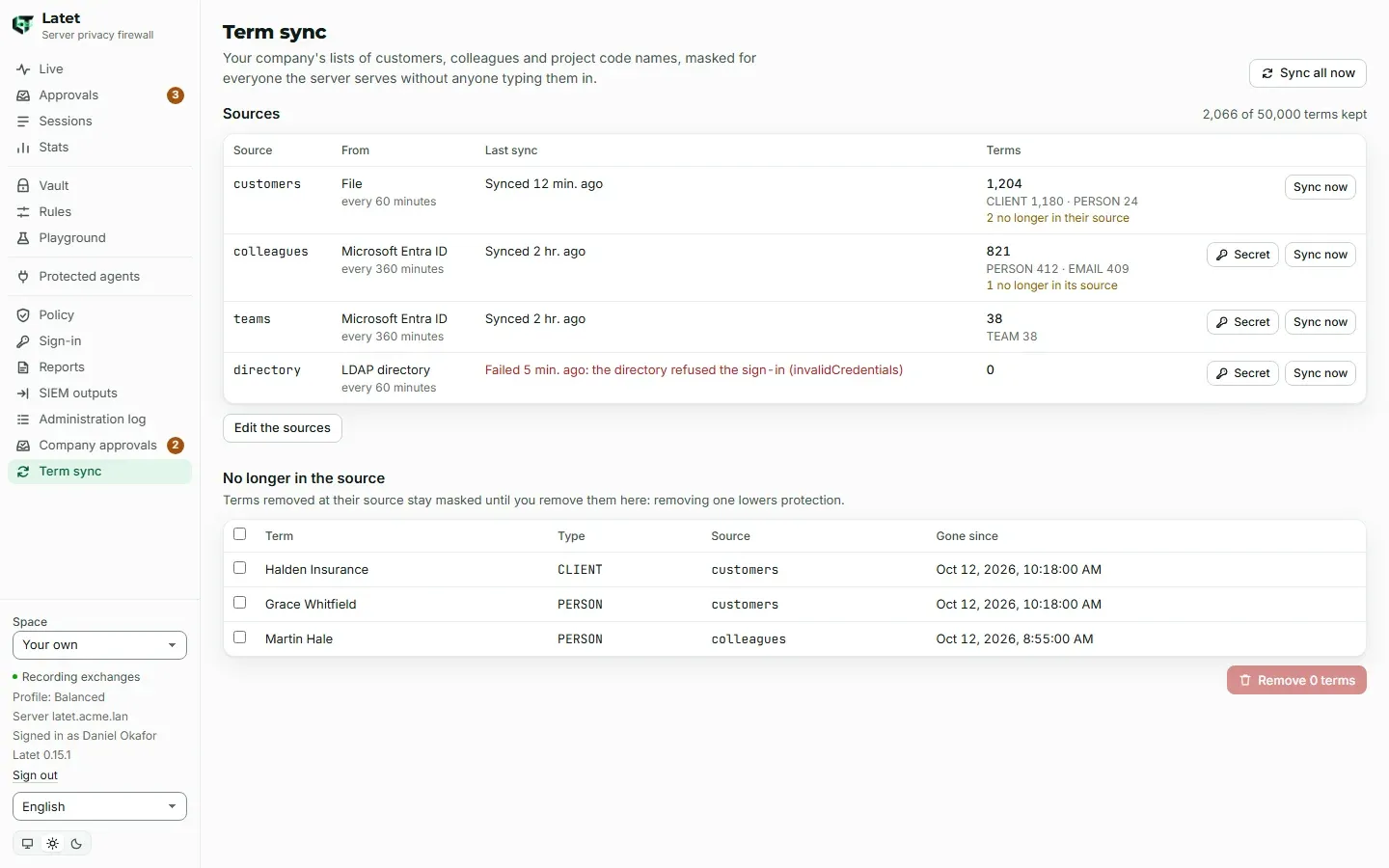
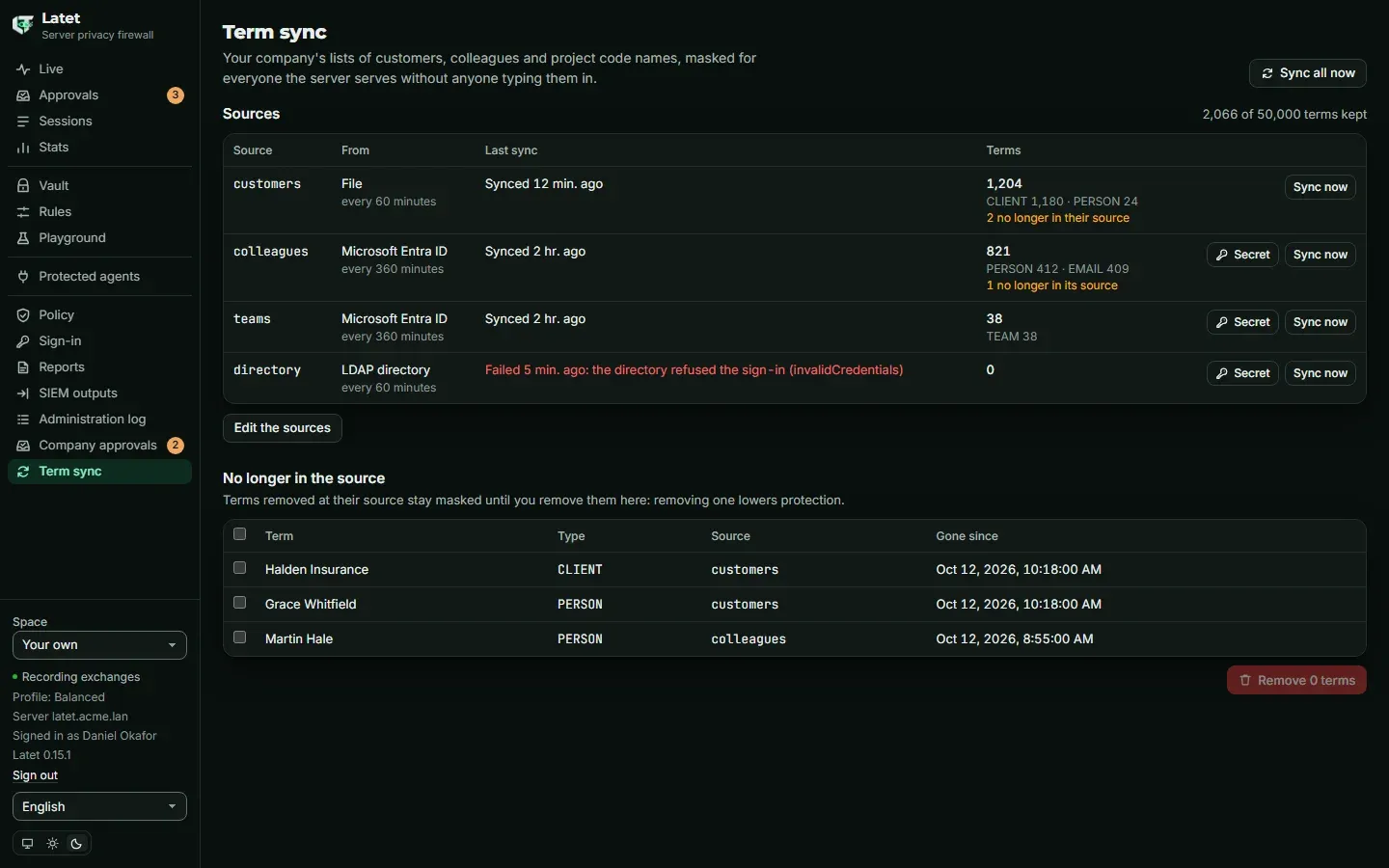
A source that fails, or that suddenly gives no term at all where it gave some (an export cut short, a filter that no longer matches), changes nothing: its terms stay as they were, and the sync is marked failed with the reason. A source taken out of the sources leaves all its terms no longer in the source.
Removing a term stops Latet looking for it. A person whose requests already had it masked keeps it in their vault, where they can forget it on the Vault page.
How the server runs it
Section titled “How the server runs it”One instance reads at a time, for 15 minutes at most: a read past them stops and changes nothing. An instance that stops in the middle gives its turn back as it stops; one that dies leaves the source to another once its turn ends. Each sync of a source reads within that turn and 50 MB at most in all.
Every instance takes new terms within 30 seconds, whatever it is reading. One that cannot (its database out of reach, or terms its master key cannot open, which it never drops: it masks those it had) says so in its own metrics (below). A reload that cannot read the terms never masks fewer: an instance that meets terms its master key cannot open keeps the terms it has, and one that never loaded them opens no new space until it can, answering 503 with a request to try again.
A sync that changes the terms ends each open WebSocket at its next message (close code 1008), and the agent’s client connects again. A request already past its reviews when the terms change is refused, with nothing of it sent, and its agent is told that the settings changed and to send it again (the settings changed while this request was prepared: send it again): before Latet decides to send it, and after that decision too, just before it is sent (for example while its address is looked up or, for Bedrock, while its AWS credentials are read). Sent again, it is masked with the new terms. A sync that changes no term masked touches nothing, nor does one that only finds terms no longer in their source or back in it, nor taking out a source, whose terms stay masked.
While the server masks synced terms, it reads each text of an applications API call on its own, as Latet 0.10 did and as for terms your company locks, where it otherwise reads a call’s texts together: masking stays the same, and a call of many texts takes longer. A server whose license lists term sync but that masks no synced term keeps reading them together.
The metrics speak for each instance, while latet server status and latet server terms status speak for the instance
that answers them: alerting on the metrics is how you learn that another instance lags or lacks a key version. Alert on
each instance whose latet_terms_masked is missing (its synced terms never loaded), whose
latet_terms_behind_seconds is above 60 (it masks older synced terms than the server holds), or whose
latet_terms_unreadable is above 0, beside the rules of Server operations:
groups: - name: latet-terms rules: - alert: LatetTermsNeverLoaded expr: up{job="latet"} == 1 unless on(instance) latet_terms_masked for: 5m - alert: LatetTermsBehind expr: latet_terms_behind_seconds > 60 - alert: LatetTermsUnreadable expr: latet_terms_unreadable > 0latet server status says the same of the instance that answers it: that it is behind, and how many terms no key of
the server opens there. A term no key of the server opens (a key version dropped from every key file, a row changed by hand) is sealed again the next time its source gives
it, by itself. One no source gives any more is removed with latet server terms remove --unreadable, which never
removes a term a source still gives, and removes nothing while a term it would remove names a newer key version than
the instance that answers holds.
An instance of an older release, or without the Enterprise Edition, masks no synced term: latet server terms status
and latet server status say so, from the release and edition each live instance announces. latet server init starts no term sync: only a running server syncs. Nothing goes to
computers: the server masks.
Where the terms are kept
Section titled “Where the terms are kept”- In the server’s PostgreSQL database, each term sealed with the server’s master key; a term’s id is a keyed hash, so the database says neither which terms it holds nor whether a guessed one is among them. The sources’ secrets are kept with the server’s other Enterprise secrets, sealed with the master key too.
- Never in
config.yaml, in a rules file or in a person’s settings: a list of customers is sensitive in itself. - Whoever holds both the database and the master key can read them, as every secret of the server
(Server operations). With another master key the terms cannot be read: syncs
fail until the right key is back, each instance keeps masking the terms it had, and
latet server terms statussays how many cannot be opened on the instance that answers it (the metrics say it for each instance). - The administration log records each change of the sources (
terms.source.changed), each secret set or removed (terms.secret.changed), each removal (terms.removed) and each sync asked for (terms.sync.asked), with names of sources and counts, never a term or a secret (Server administration). - Each sync and each removal is an event (
sync), with the source when there is one, the outcome and the counts by type (Reports). - The server’s metrics,
latet_terms_*, count by kind and outcome, never a source’s name, a type or a term (Events to your SIEM).
Whoever sets the sources (the server’s administrators, and people with the security role) can make the server read any
file in the term-sync folder, or an https document or a directory of your network (anonymously, or as the account whose
secret they set), and then see the fields its mapping names, as terms, once they are no longer in their source: take a
source out after a sync, and its values show among the terms no longer in their source. The reason of a failed sync
also tells whether a file of a given name is in the folder. The server connects only through its own checks: never to
a link-local, metadata or reserved address, to its own loopback only where the address names it (set with
latet server terms alone), and with no redirect. Inside your network it reaches what the server’s own network
reaches, the server’s own address, its other instances and its database and Valkey hosts included. A person adds or
moves at most 10 sources’ destinations an hour from the page (a file source has none), and every change of the sources
and every sync asked for is in the administration log: give these roles to people you trust with the files of that
folder and with what your intranet makes available. A directory is read with ldap3, which holds a whole page of the
directory’s answer before Latet can count its size: a directory a source points at can make the instance that reads it
hold one very large answer.
Masking shows what it masks: whoever sends a text through their space can tell whether a name they already have is one of the synced terms, as with a term your company locks. Nobody but the security role and the server’s administrators can list them.
When the license ends
Section titled “When the license ends”Term sync goes on through the 30 days of grace that follow the license’s end. After them, with more people and API keys than the license covers for longer than the grace, or at the end of a trial, term sync pauses: no source is read, nothing is removed or changed (Sync now and Remove are refused), and the terms synced so far stay masked. Removing the license, or installing one that does not list term sync, stops them being masked: Latet asks first.
What was tested
Section titled “What was tested”Latet’s automated tests read every kind of source: files, a fake web server, a fake Microsoft Entra ID and Microsoft Graph, ldap3’s mock directory, and a directory of their own for TLS; two instances of a server share PostgreSQL and Valkey in them.
They were also run against OpenLDAP 2.6.10, Debian’s slapd package, in Docker on a development computer: a source over
LDAPS and one over STARTTLS, each signed in as a service account that the directory lets read and nothing more, its
password set with latet server terms secret, each with a base, a filter and a mapping of people ("{givenName} {sn}": PERSON, mail: EMAIL) or of groups (cn: TEAM), and the certificate authority’s PEM file in the term-sync
folder. The people’s names and addresses and the groups’ names were masked on both instances; a person taken out of the
directory left their terms no longer in the source, and still masked; an ldap:// source with start_tls: false was
refused when the sources were set; and with an authority that had not signed the directory’s certificate, both sources
were refused, saying that the directory’s certificate was not trusted, and gave no term. All of it ran twice, the
directory written 127.0.0.1 and then localhost, on Windows, which gives ::1 first where the directory listened on
127.0.0.1 alone.
The three alerts above were loaded as printed in Prometheus 3.16.0, with the scrape job latet of
Server operations and a target for each of two instances. On an instance whose
master key lacked the version the terms were sealed with, LatetTermsUnreadable fired at once, and
LatetTermsNeverLoaded was pending for its five minutes, then fired; the instance that masked the terms raised neither.
Directories are set up in many ways: if one of yours reads differently than this page says, an issue with what you saw helps.
© 2026 Emanuele Casabona · VAT IT02293040990 · Privacy policy · Legal notice · latet.ai